


This post may contain affiliate links. If you make a purchase through one of these links, I earn a small commission at no extra cost to you. Read my full disclosure here.
Etsy shared access finally gives shop owners a safer way to let other people help run their businesses.
You can invite up to five team members, let each person sign in with a separate Etsy account, and hand off specific day-to-day tasks without giving away your password or opening your financial dashboard.
If your shop has grown beyond what one person can comfortably manage, this is a big deal.
Etsy sellers have spent years building workarounds, paying for third-party software, or deciding that sharing their main login was too risky.
Etsy has now created a native option for delegation, and it could change how sellers hire virtual assistants, bring family members into the business, and prepare for busy seasons.
There are limits, though. Shared access is not a full administrator role, and your team members will not be able to touch every part of the shop.
Let’s walk through exactly what changed, what your helpers can do, and what you still need to handle yourself.

What Is Etsy Shared Access?
Etsy shared access is a Shop Manager feature that lets a shop owner invite other people to work inside the shop using their own Etsy accounts.
According to Etsy’s September 2026 shop update, Etsy built the feature after hearing that sellers wanted a better way to share the work of running a growing shop.
You can invite up to five people. Etsy says these team members may include a family member, business partner, or seasonal assistant. Each person signs in with their own email address and password, which means you no longer need to pass your primary Etsy credentials back and forth.
This is the delegation feature Etsy sellers have needed for years.
Until now, assigning work inside an Etsy shop involved an uncomfortable choice. You could keep every task on your own plate, use outside software for the tasks it supported, or share credentials that also controlled sensitive areas of the business. Shared access gives sellers a more practical middle ground.
This is especially useful once you reach the stage described in my guide to scaling an Etsy print-on-demand shop.
Growth eventually creates more customer messages, orders, tracking updates, listing drafts, and seasonal work. A business cannot give you more freedom if every routine task still depends on you.
What Etsy Team Members Can Do
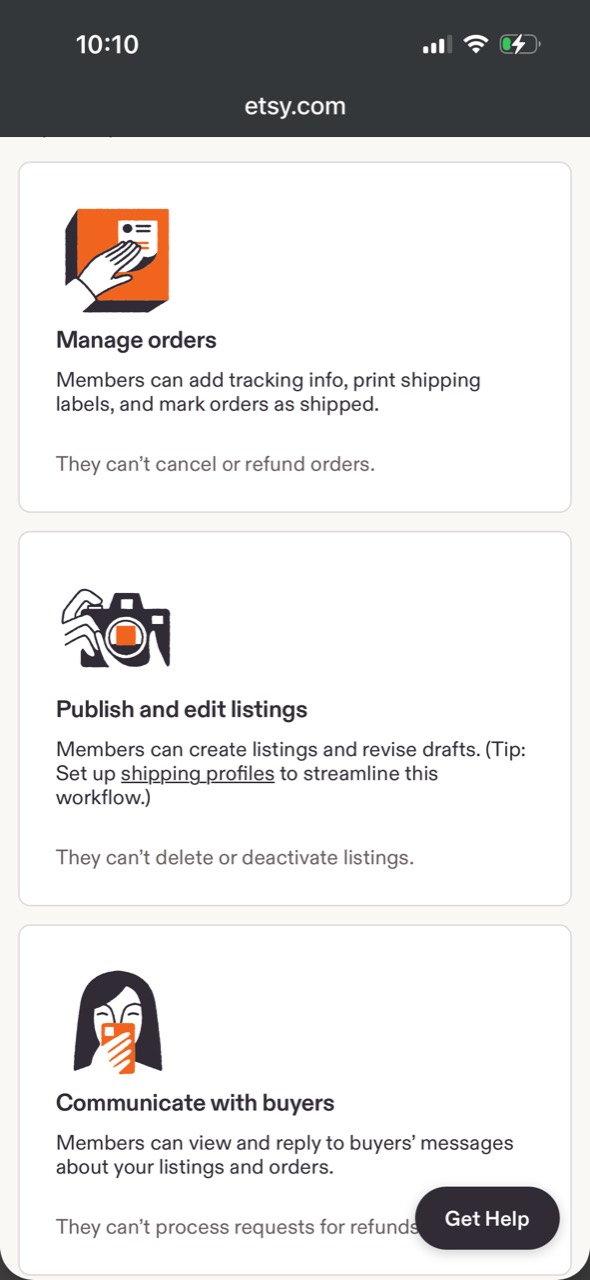
Etsy currently groups shared-access work into three practical areas: managing orders, publishing and editing listings, and communicating with buyers. Those categories cover a meaningful portion of the repetitive work that fills a seller’s day.
Manage Orders and Shipping Tasks
Team members can add tracking information, print shipping labels, and mark orders as shipped.
That makes shared access useful for a spouse who helps with fulfillment, a studio assistant packing physical products, or a virtual assistant who monitors print-on-demand orders and confirms that tracking has synced correctly.
For POD sellers, this permission could support a simple exception-management workflow. Your assistant can review open orders, identify anything that has not moved as expected, add tracking when necessary, and make sure completed orders are marked shipped.
If you are still building your workflow, my step-by-step Printify setup guide explains how the Etsy and Printify pieces fit together.
The restriction matters: team members cannot cancel or refund orders. Those decisions remain with the shop owner.
That boundary protects actions that directly affect your money and your relationship with the buyer, but it also means your operating procedure needs an escalation step. Your helper should know exactly when to bring an order problem to you.
Create Listings and Revise Drafts
Team members can create listings and revise drafts. This is one of the most useful parts of the new feature because listing production can become a serious bottleneck in a growing POD shop.
You could prepare the design, mockups, keyword research, pricing rules, and shipping profiles, then let an assistant assemble the listing draft. The assistant could enter the title, description, tags, production-partner details, mockup images, and variations according to your standard operating procedure. You can then review the draft before it goes live.
Etsy’s current help documentation confirms that team members can create, edit, and publish listings. They cannot delete or deactivate listings.
That is a meaningful amount of access, so do not treat this as a draft-preparation role unless you set that expectation with the person you invite. Your workflow should clearly state which listings they may publish and which ones require your review first.
Shipping profiles will make the handoff easier because your helper can select a prepared profile instead of rebuilding shipping settings for every listing. The same principle applies to reusable description templates and a quality-control checklist. Delegation works best when the process is clear before another person touches it.
If your listing system is still being built, start with the Etsy print-on-demand beginner guide. Shared access can save time, but it cannot repair an unclear product strategy or an inconsistent listing process.

DONE-FOR-YOU ETSY RESEARCH, DELIVERED WEEKLY
Stop Guessing What to List Next
Every week, get one in-demand Etsy keyword with low competition, a video breakdown, and nine products already selling for that keyword. This done-for-you research saves you hours and gives you real Etsy market evidence that AI cannot currently produce on its own.
Included with Freedom Unclocked, or available separately for $9 per month.
See What Is Inside the Opportunity Report
Start My $9/Month ReportReply to Buyer Messages
Invited members can view and reply to buyer messages about your listings and orders. For shops with a high volume of personalization questions, delivery updates, and sizing inquiries, this permission alone could return hours to the owner every week.
Your assistant can answer repeat questions using approved response templates, check order details, and keep conversations moving while you work on product development.
This could be particularly helpful during the fourth quarter, Mother’s Day, graduation season, or any period when messages arrive faster than one person can manage them.
Team members cannot process refund requests. If a buyer asks for money back, the helper can gather the relevant information and prepare the conversation, but the owner needs to make and complete the refund decision.
Customer service is still part of your brand. Give anyone answering messages clear guidance on tone, response times, personalization policies, replacements, late deliveries, and when to escalate. Access makes the work possible. Training keeps it consistent.
What Team Members Cannot Access
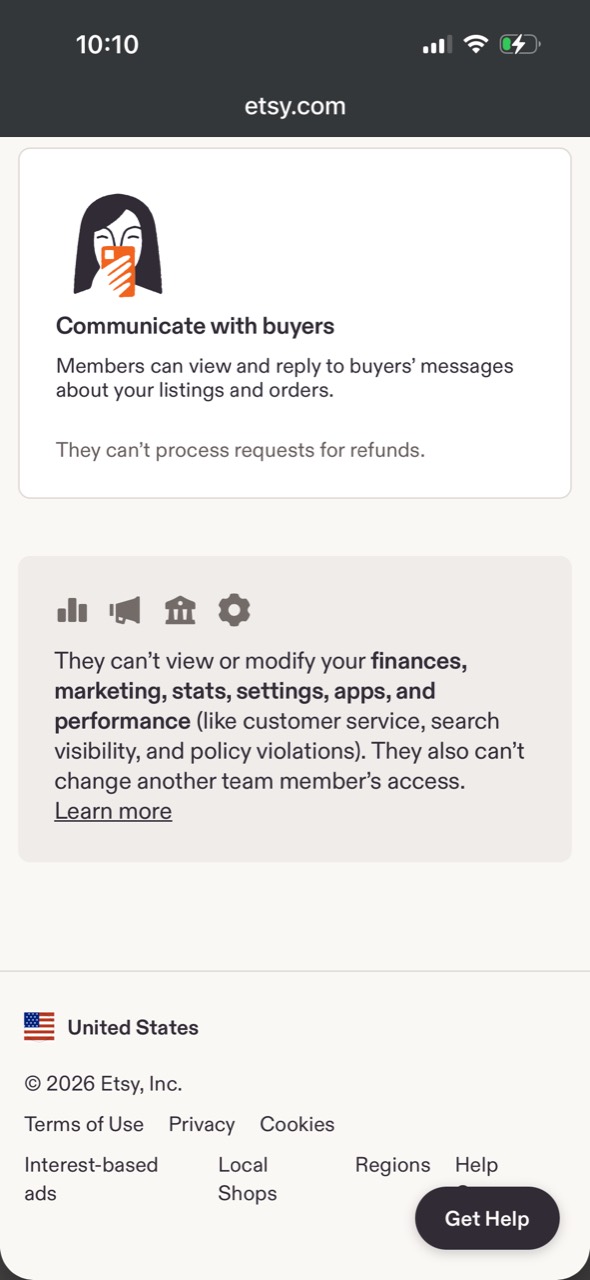
Etsy has placed a firm wall around several sensitive areas. Team members cannot view or modify your finances, marketing, stats, settings, apps, or performance information.
Performance includes customer-service data, search visibility, and policy violations. A team member also cannot change another person’s access.
These restrictions are a major reason shared access is safer than handing over the owner login. Your assistant can perform approved operational work without seeing revenue, deposit information, bank details, advertising controls, or sensitive account settings.
There is a tradeoff. A marketing contractor cannot use shared access to manage Etsy Ads. An analyst cannot review your Stats dashboard.
A shop manager cannot investigate search-visibility warnings or policy violations through this role. You will still need to export information, share selected screenshots, or handle those areas yourself.
The role is best understood as operational access, not full management authority. It is designed for completing defined tasks inside orders, listings, and messages. The owner remains responsible for money, account health, strategic decisions, and irreversible actions.
How to Find Shared Access in Etsy
On Etsy.com, open Shop Manager and go to Settings. Select Shared access, then choose Invite team member. Etsy will guide you through the invitation so the person can connect using their own account.
The screenshots for this article show the feature on Etsy’s mobile website. If you do not see Shared access in the Etsy Seller app, open Etsy.com in a browser and check Shop Manager there. Etsy sometimes launches or manages new seller settings on the web before every part of the mobile app catches up.
The person you invite must be at least 18 and must turn on two-factor authentication before accepting. Their email address cannot already be connected to another Etsy shop, including a draft shop. It also cannot belong to someone who has an order from your shop that is still inside its return window.
An invitation expires after seven days. Etsy currently lets owners invite and manage team members on Etsy.com, but not inside the Etsy Seller app. If an invitation fails, check the email address, the account’s shop association, its purchase history with your shop, and the invitation date before contacting support.
Once an invitation is accepted, start with one controlled task. Ask the team member to open a test draft, review an order that does not need changes, or locate a sample buyer conversation. Confirm what the invited account can see before handing over a live queue.
Know the Limits of the Permission System
Every invited team member currently receives the same access level. Etsy does not give you separate roles for a customer-service assistant, listing specialist, or fulfillment helper. Someone invited only to answer messages will technically receive the same shared-access capabilities as someone managing listings and orders.
That makes hiring, written permissions, and activity reviews important. Etsy lets the owner download CSV activity logs for messages, orders, and listings from the Shared access page. Use those logs as a review tool, especially during onboarding. Etsy also states that the shop owner is responsible for activity performed by team members.
How to Delegate Without Creating a New Mess
Shared access removes the password problem. It does not remove the management problem.

Before inviting someone, decide what they own, what they may prepare for your approval, and what they must never decide alone. “Help with Etsy” is too vague. “Review open orders every weekday, confirm tracking has synced, and escalate any order that is five business days late” is something a person can follow.
Build the Process Before the Handoff
Create a short standard operating procedure for each delegated task. Include the trigger, the steps, screenshots, the expected result, and the situations that require your attention. A five-minute screen recording can be useful, but pair it with a written checklist so the process is searchable.
For listings, document your title format, image order, approved mockup types, tag rules, production-partner disclosure, pricing method, shipping profile, and final review procedure.
Etsy has added more customization controls over time, so your procedure should also reflect the current options discussed in my breakdown of Etsy’s personalization update.
For messages, prepare examples of an excellent reply. Add clear escalation rules for refunds, damaged products, intellectual-property complaints, threats, chargebacks, and anything involving an Etsy case. Your assistant should never have to guess where their authority ends.
Use the Least Access Needed
Invite only people who currently need access. Seasonal help should not remain connected indefinitely after the season ends. Review the access list on a regular schedule, especially when a contractor’s project ends or a team member changes roles.
Etsy says owners can change team-member access at any time.
Make removing access part of your offboarding checklist, along with revoking access to shared drives, project-management tools, email accounts, and any third-party apps used in the workflow.
Keep Owner-Only Reviews in Place
A second pair of hands can improve capacity, but the shop owner is still accountable for what happens in the account. Review a sample of completed work each week. Check message quality, listing accuracy, tracking updates, and unresolved exceptions.
At first, review every draft. Once the person has demonstrated consistent accuracy, move to spot checks. The goal is not to hover forever. The goal is to make sure the process works before you depend on it.
Does Etsy Shared Access Replace Third Party Software Like Vela?
Not completely. Etsy shared access and Vela solve overlapping frustrations, but they are different tools.
Shared access lets another person work directly inside your Etsy shop without using the owner’s credentials.
It is a permissions and delegation feature. Vela is third-party listing-management software built for tasks such as bulk editing, copying listings, managing profiles, and working across connected shops.
If you have been paying for a tool only because another person needed a safer way to help with basic Etsy operations, shared access may reduce that need.
If you rely on bulk-editing functions, cross-shop workflows, profiles, or other specialized capabilities, Etsy’s new role may not replace the software.
Audit your actual workflow before canceling anything. Write down the tasks you use Vela or another tool to complete, then compare them with Etsy’s shared-access permissions. The better question is not “Can I cancel Vela?” It is “Which tool is doing a job my business still needs?”
You can compare the broader software stack in my guide to the best tools for Etsy sellers. Good software should save more time or prevent more mistakes than it costs. A native Etsy feature may change that calculation, but it will not make every specialized tool unnecessary.
Who Should Use Etsy Shared Access?
Shared access is worth considering if routine Etsy tasks are keeping you from design work, product research, marketing, or time away from the business.
It is also useful when a family member already helps with fulfillment, when you hire a virtual assistant to assemble listing drafts, or when you need seasonal customer-service support.
You may not need it yet if your order and message volume is small, your listing process is still changing every week, or training another person would take longer than completing the work. Delegation is most effective when a repeatable process already exists.
Do not hire simply because Etsy added a button. Start by tracking where your time goes for one week.
Look for repeated tasks with clear inputs and clear definitions of “done.” Those are the strongest candidates to hand off.
Why This Feature Matters for a Freedom-First Business
A shop that depends on its owner for every message, tracking update, and listing field has a capacity ceiling. You may generate passive income from Etsy, but the business itself still contains active work. The point of a freedom-first business is to decide which work needs your judgment and which work can become a documented system.
Etsy shared access makes that system safer. Your helper gets a separate identity. Your password stays private.
Your financial information remains restricted. You can track what team members do and adjust access without rebuilding your entire workflow around a third-party workaround.
This feature will not turn delegation into magic. You still need good hiring, training, documentation, and quality control. What Etsy has finally done is give shop owners the account structure needed to make those practices realistic.

ETSY POD COURSE + LIVE SUPPORT + COMMUNITY
Ready to Build an Etsy Shop That Supports Your Freedom?
Learn the strategy I used to build a multi-six-figure Etsy shop business. Freedom Unclocked includes a complete Etsy POD course, twice-monthly live group coaching, on-demand tutorials, and a community of sellers helping you implement it.
See Everything Inside Freedom Unclocked
Join Freedom UnclockedFinal Thoughts
Etsy shared access is one of those updates that makes you wonder why sellers had to wait so long. Shop owners can finally invite up to five people, give them separate sign-ins, and delegate meaningful daily work while keeping finances and sensitive account controls protected.
Start small. Invite one trusted person, assign one documented process, and verify the permissions in your own shop. Then expand the role when the work is accurate and the handoff genuinely saves you time.
The feature is available under Shop Manager > Settings > Shared access. If it is in your account, this is a good week to decide which task you should stop carrying alone.
The Best Resources for Your Print on Demand Business:
These are the resources I use for my multi six-figure Print on Demand business!
Canva: Canva is the most amazing tool. It is user friendly, and always improving! The tools that Canva has have evolved so much since I first started using it in 2022 for the better. I use it almost everyday. I use it to create designs, to edit AI designs, and to create product mockups.
Ideogram: Ideogram is an AI design tool that generates high-quality graphics with exceptionally accurate text rendering, making it ideal for creating quote-based and typography-focused designs. I also use the prompt based editing for mockups, making it a wonderful alternative to Photoshop, which is expensive.
E-Hunt: E-Hunt is fantastic for competitor research and some light keyword research. My favorite aspect of E-Hunt is the Chrome extension that allows you to see the sales amount for an individual item on Etsy. Check out this article to see an example.
eRank: eRank is an SEO data tool that also allows you to search the competition and will also give you key words for your Etsy listing. It is also a low cost tool that will help you find low competition and highly searched niches.
Printify: Printify is a print-on-demand (POD) service that allows individuals and businesses to create and sell custom-designed products without needing to manage inventory or handle fulfillment. I put my designs on products offered by Printify. When an item sells, Printify prints and ships to my customer.
ProfitTree: is the tool I use for profit analysis and AI-powered analysis of all of my Etsy shops. I use ProfitTree’s MCP connect to ChatGPT/Codex to my account and can run all sorts of analyses using my own data! I can even do demand research all inside ChatGPT (also works inside Claude).
AnywherePOD: AnywherePOD is the tool I use for automation and diving into personalization. I can bulk upload products to Printify, which is a game changer. AnywherePOD also has an AI Assistant that can bulk upload designs, multi-design and multi-variant listings! If you want to list and grow faster, you need AnywherePOD.
Vela: Vela is the bulk editing tool I use to manage hundreds of Etsy and Shopify listings without losing my mind. You can update videos, photos, titles, tags, descriptions, and prices across your entire shop in minutes, and your VA can build listings inside Vela without needing your Etsy login. Read more about Vela here.
Shopify: Shopify is what I recommend when you are ready to scale beyond Etsy and diversify where your products sell. The fees are lower, you own your customer data (emails), and it integrates directly with Printify and Vela. It is the easiest way to build a standalone storefront that you control. Read more about Etsy v Shopify here.
FAIRE: FAIRE is the wholesale marketplace I use to sell my products to retail, brick and mortar stores. If you want to scale your shop and add a wholesale revenue stream to your POD business, FAIRE is a great option. Read more about FAIRE here.
📌 Share on Pinterest

Looking for more information on print on demand? Check out these articles:
- Gotcha Day Pet Gifts: What To List Now
- Etsy Digital Downloads Can Become Physical Prints: Should POD Sellers Worry?
- Honest ProfitTree Review: How I Research Products and Understand My Etsy Profit
- Etsy POD Christmas Trends 2026: 7 Gift Ideas to Test Now
- Etsy POD Trends for Q4 2026: 3 Opportunities to Test Now
- Silly Goose Etsy Trend: POD Ideas to Test Now
- Memento Mori Gifts: The Best Etsy POD Ideas to Test
- Etsy Trends Search: Nature Journaling Gifts What to List Now
- Etsy Live Preview for Custom Listings: The Ultimate Guide to Setting It Up
- Calculating Etsy Fees for POD Sellers: Your Ultimate Guide
- Etsy Fall Home Decor Trends: What To List Now
- Etsy v Shopify for Print on Demand: Which One is Actually Right For You?
- The Ideogram Background Remover is Here
- Etsy’s Personalization Update: What POD Sellers Need to Know
- How to Price Print on Demand Products on Etsy
- Lifestyle By Design: The Ultimate Inspiration
- How to Set Up Printify Step-By-Step: The Ultimate Guide
- The Best Print on Demand Products to Sell on Etsy
- Etsy Tags: The Complete Guide to SEO Visibility
- Ideogram Custom Models: Game Changer For Print on Demand
- The Best AI Image Generators for Etsy POD Sellers
- Printify’s New Multi-Product Listing: Game Changer for Esty POD Sellers
- How I Retired at 42: My Story and Best Advice
- ProfitTree vs. eRank vs EverBee vs Alura: Which Etsy Tool Is Best?
- The Be Do Have Mindset: The Best Way to Thrive on Etsy
- Etsy’s New Review Ratings Calculation: What Print on Demand Sellers Need to Know (And What Etsy Isn’t Saying)
- How to Scale Your Etsy Print on Demand Shop
- Etsy Seller Trend Report Spring and Summer 2026: What POD Sellers Need to Know
- Passive Income for Artists: How to Sell Your Art on Etsy with Print on Demand
- How to Get Vela and Finally Scale Your Etsy Print on Demand Shop Like a CEO
- Closing a Chapter in Life: Leaving Burnout Behind And Starting Over Abroad
- How A Multi Six-Figure Shop Owner Tells You How To Use eRank for Etsy Print on Demand
- eRank vs Etsy Marketplace Insights: Which SEO Tool Is Best?
- Etsy Spring Trends for 2026: The Best Post-Christmas Boost
- The Best Etsy Print on Demand Course And Why
- Ideogram’s Prompt Based Editing Makes It One of The Best Mockup Creation Tools for Etsy POD Sellers
- Is Etsy Still Worth It in 2026? An Honest Answer From Six-Figure Seller
- The Best Art Prompt Generator for Etsy POD Sellers
- Etsy Trends for 2026: The Ultimate Guide for POD Sellers on How to Turn Pinterest’s Predictions Into Sales
- Amazon Print on Demand Opens New Income Stream for Sellers
- Print on Demand Market Growth is Booming: How to Ensure Your Etsy Shop Will Too
- Etsy Trending Searches 2026: What Buyers Want Right Now (And How POD Sellers Can Cash In)
- Amazon Handmade vs Etsy: Which Platform Is Better for Handmade Sellers?
- What Is Faire? Guide for Etsy POD Sellers
- Is Etsy Plus Worth It? An Honest Breakdown From a Multi 6-Figure Etsy Seller
- How Many Listings Should I Have on Etsy?
- How to Use Midjourney Privately
- How to Use the Midjourney Seed Parameter for Consistent Print-on-Demand Designs
- How to Use Midjourney Stylize for Better Design Results
- How to Use Etsy Marketplace Insights
- Should I Change My Etsy Titles?
- Etsy vs Redbubble: Which Platform Is Better?
- Are Print On Demand Candles Profitable on Etsy?
- Etsy Print on Demand Income Report: April 2025 ($6K+)
- Print on Demand Stickers on Etsy: Are They Profitable?
- $300K+ Passive Income Etsy Shop: My Best Go-To Tools
- Is eRank Worth It? Review From a 6-figure Etsy Seller
- Etsy Print on Demand Income Report: March 2025 ($8K+)
- How to Achieve Location Independence with Etsy Print on Demand
- Etsy Print on Demand Income Report: February 2025 ($7K+)
- The Best Tools for Etsy Sellers
- Is Print on Demand Profitable?
- Are Etsy Ads Worth It?
- Etsy Print on Demand Income Report: January 2025 ($10K+)
- Etsy Trending Searches in 2026: Plus How to Use Them to Boost Sales
- Etsy Print on Demand Income Report: December 2024 ($28K+)
- The Ultimate Etsy Print-on-Demand: Step-by-Step Beginners Guide
- Etsy Print on Demand Income Report: November 2024 ($21K+)
- EtsyHunt Review: A Tool for Etsy Print on Demand Sellers
- Etsy Print-On-Demand Income Report for October 2024 ($11K)
- Etsy Print on Demand Income Report: September 2024 ($12K+)
- Etsy Print on Demand Income Report: August 2024 ($13K+)
- Quarterly Etsy Income Report: Over $18,000 in Three Months (Q2 – 2024)
- How to Find High-Demand, Low-Competition Etsy Niches
- Etsy Trending Niches: Boost Sales with Print on Demand
- Quarterly Etsy Income Report: Over $20,000 in Three Months (Q1 – 2024)
- Side Hustle: Can You Really Make $2200 a Month on Etsy?
- How To Get Found On Etsy: My First Year on Etsy
- Gotcha Day Pet Gifts: What To List Now
- Etsy Digital Downloads Can Become Physical Prints: Should POD Sellers Worry?
- Honest ProfitTree Review: How I Research Products and Understand My Etsy Profit
- Etsy POD Christmas Trends 2026: 7 Gift Ideas to Test Now
- Etsy POD Trends for Q4 2026: 3 Opportunities to Test Now
- Silly Goose Etsy Trend: POD Ideas to Test Now
- Memento Mori Gifts: The Best Etsy POD Ideas to Test
- Etsy Trends Search: Nature Journaling Gifts What to List Now
- Etsy Live Preview for Custom Listings: The Ultimate Guide to Setting It Up
- Calculating Etsy Fees for POD Sellers: Your Ultimate Guide
- Etsy Fall Home Decor Trends: What To List Now
- Etsy v Shopify for Print on Demand: Which One is Actually Right For You?
- The Ideogram Background Remover is Here
- Etsy’s Personalization Update: What POD Sellers Need to Know
- How to Price Print on Demand Products on Etsy
- Lifestyle By Design: The Ultimate Inspiration
- How to Set Up Printify Step-By-Step: The Ultimate Guide
- The Best Print on Demand Products to Sell on Etsy
- Etsy Tags: The Complete Guide to SEO Visibility
- Ideogram Custom Models: Game Changer For Print on Demand
- The Best AI Image Generators for Etsy POD Sellers
- Printify’s New Multi-Product Listing: Game Changer for Esty POD Sellers
- How I Retired at 42: My Story and Best Advice
- ProfitTree vs. eRank vs EverBee vs Alura: Which Etsy Tool Is Best?
- The Be Do Have Mindset: The Best Way to Thrive on Etsy
- Etsy’s New Review Ratings Calculation: What Print on Demand Sellers Need to Know (And What Etsy Isn’t Saying)
- How to Scale Your Etsy Print on Demand Shop
- Etsy Seller Trend Report Spring and Summer 2026: What POD Sellers Need to Know
- Passive Income for Artists: How to Sell Your Art on Etsy with Print on Demand
- How to Get Vela and Finally Scale Your Etsy Print on Demand Shop Like a CEO
- Closing a Chapter in Life: Leaving Burnout Behind And Starting Over Abroad
- How A Multi Six-Figure Shop Owner Tells You How To Use eRank for Etsy Print on Demand
- eRank vs Etsy Marketplace Insights: Which SEO Tool Is Best?
- Etsy Spring Trends for 2026: The Best Post-Christmas Boost
- The Best Etsy Print on Demand Course And Why
- Ideogram’s Prompt Based Editing Makes It One of The Best Mockup Creation Tools for Etsy POD Sellers
- Is Etsy Still Worth It in 2026? An Honest Answer From Six-Figure Seller
- The Best Art Prompt Generator for Etsy POD Sellers
- Etsy Trends for 2026: The Ultimate Guide for POD Sellers on How to Turn Pinterest’s Predictions Into Sales
- Amazon Print on Demand Opens New Income Stream for Sellers
- Print on Demand Market Growth is Booming: How to Ensure Your Etsy Shop Will Too
- Etsy Trending Searches 2026: What Buyers Want Right Now (And How POD Sellers Can Cash In)
- Amazon Handmade vs Etsy: Which Platform Is Better for Handmade Sellers?
- What Is Faire? Guide for Etsy POD Sellers
- Is Etsy Plus Worth It? An Honest Breakdown From a Multi 6-Figure Etsy Seller
- How Many Listings Should I Have on Etsy?
- How to Use Midjourney Privately
- How to Use the Midjourney Seed Parameter for Consistent Print-on-Demand Designs
- How to Use Midjourney Stylize for Better Design Results
- How to Use Etsy Marketplace Insights
- Should I Change My Etsy Titles?
- Etsy vs Redbubble: Which Platform Is Better?
- Are Print On Demand Candles Profitable on Etsy?
- Etsy Print on Demand Income Report: April 2025 ($6K+)
- Print on Demand Stickers on Etsy: Are They Profitable?
- $300K+ Passive Income Etsy Shop: My Best Go-To Tools
- Is eRank Worth It? Review From a 6-figure Etsy Seller
- Etsy Print on Demand Income Report: March 2025 ($8K+)
- How to Achieve Location Independence with Etsy Print on Demand
- Etsy Print on Demand Income Report: February 2025 ($7K+)
- The Best Tools for Etsy Sellers
- Is Print on Demand Profitable?
- Are Etsy Ads Worth It?
- Etsy Print on Demand Income Report: January 2025 ($10K+)
- Etsy Trending Searches in 2026: Plus How to Use Them to Boost Sales
- Etsy Print on Demand Income Report: December 2024 ($28K+)
- The Ultimate Etsy Print-on-Demand: Step-by-Step Beginners Guide
- Etsy Print on Demand Income Report: November 2024 ($21K+)
- EtsyHunt Review: A Tool for Etsy Print on Demand Sellers
- Etsy Print-On-Demand Income Report for October 2024 ($11K)
- Etsy Print on Demand Income Report: September 2024 ($12K+)
- Etsy Print on Demand Income Report: August 2024 ($13K+)
- Quarterly Etsy Income Report: Over $18,000 in Three Months (Q2 – 2024)
- How to Find High-Demand, Low-Competition Etsy Niches
- Etsy Trending Niches: Boost Sales with Print on Demand
- Quarterly Etsy Income Report: Over $20,000 in Three Months (Q1 – 2024)
- Side Hustle: Can You Really Make $2200 a Month on Etsy?
- How To Get Found On Etsy: My First Year on Etsy
