


This post may contain affiliate links. If you make a purchase through one of these links, I earn a small commission at no extra cost to you. Read my full disclosure here.
If you’ve been trying to figure out how to set up Printify step-by-step, you are in exactly the right place.
No more procrastinating! Not someday. Not after you take three more courses or watch forty more YouTube videos.
Right now, today, in a couple of hours, you can have a real product listed on Etsy and your print on demand business officially up and running.
I know how it feels to sit in front of your laptop with seventeen tabs open and a brain full of half-baked information that doesn’t quite connect. You’ve heard about passive income from Etsy.
You’ve seen the income screenshots. But every time you try to figure out where to start, you end up more confused than when you began.
This guide is the one I wish I had when I was staring at a blank screen wondering what the heck “print provider” even meant.
We’re going to walk through every single step, from creating your free account to publishing your first product, and I’m going to break down the pricing math so it actually makes sense. By the end, you’ll know exactly what to do and why.

What Is Printify and Why Does It Work So Well With Etsy
Printify is a print on demand platform that connects you to a network of print providers all over the world.
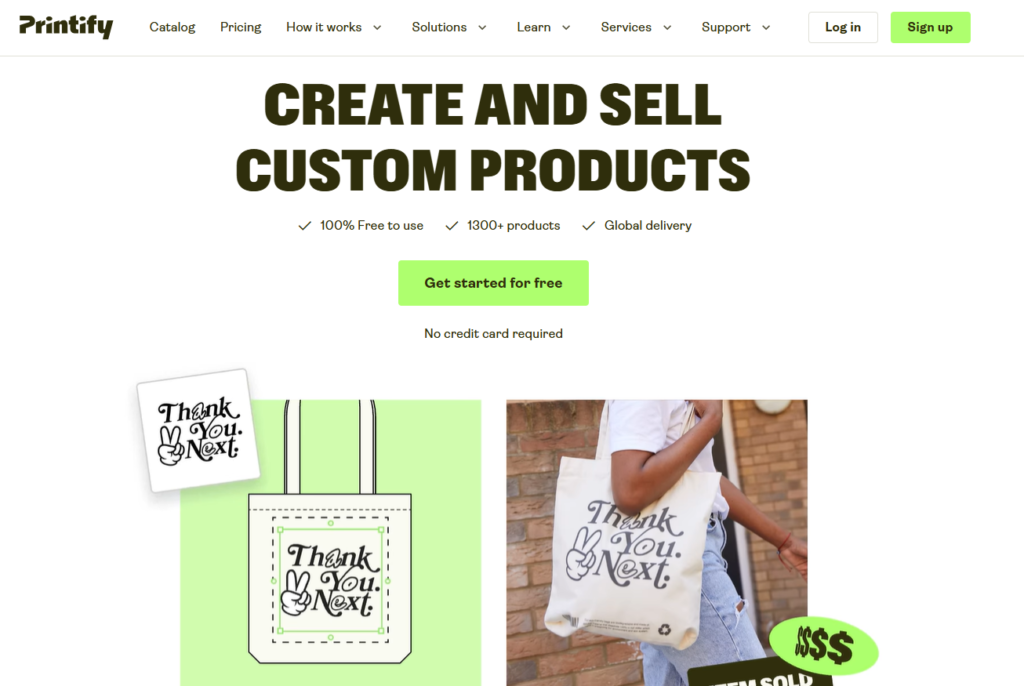
You design a product, set your price, and when a customer places an order on Etsy, Printify handles the printing and ships the product directly to your customer. You never touch the inventory. You never buy anything upfront.
The reason Printify works so well with Etsy is that the two platforms integrate seamlessly. Once you connect them, orders flow automatically from your Etsy shop into Printify’s system.
Your customer gets their item, and you collect the profit on the difference between what the print provider charges you (to produce and ship your item) and what the customer paid.
This is what a freedom-first business actually looks like in practice: you set it up once, and it keeps working while you’re living your life in Portugal, like me.
Printify currently offers over 1,300 products including t-shirts, hoodies, mugs, tote bags, phone cases, pillows, blankets, stickers, and a lot more. You’ve got options on what to sell. Lots of them.
Step 1: Create Your Free Printify Account
Go to Printify.com and click the “Sign Up” button. You’ll see three options: register with your email address, sign in with Google, or sign in with Facebook. Pick whatever works best for you. The whole thing takes about five minutes.
Here’s something that trips a lot of people up: Printify does not require a credit card to sign up.
Printify is free to set up an account. You only pay when a customer places an order, and at that point Printify charges your card for the production cost and the shipping cost for that specific order.
That’s the pay-per-order model of print on demand, and it’s genuinely one of the best things about this business structure.
Once you’re in, you’ll want to fill out your business information. Add your business name, address, and contact details. You’ll also be asked to select your primary business type.
Important note: if you are new to this model, and you are selling on Etsy you should know that you have to pay upfront for the cost and production of any items sold from your store. In the first 90 or so days of your Etsy shop, Etsy will place a reserve on your shop. That means once you sell an item, Etsy will not release your funds until you have shipped the item to the customer with a valid tracking number, or after 45 days whichever comes first. Many sellers don’t realize in the beginning that they will have to put up the cost of any items sold temporarily. It is not a long time, typically items take 3-5 days to ship to the customer.
Choose print on demand seller or e-commerce, whatever fits best. Then set up your payment method. A credit or debit card works fine here. You won’t be charged until your first sale comes in.
The Pay-Per-Order Model Explained Simply
When someone buys a t-shirt from your Etsy shop for $25, Printify charges your card, say, $10 total for production and shipping.
You collect the $25 from the customer through Etsy (minus Etsy’s fees), and the difference is your profit. You never prepaid for that t-shirt. You never risked your own money sitting in boxes of inventory in your garage hoping it would sell.
This is a big deal, especially if you’re coming from a retail or wholesale background where buying inventory upfront is just the way things work. The POD model flips that. Your money stays in your pocket until a sale happens.

Step 2: Connect Printify to Your Etsy Shop
This is where the magic happens. Inside your Printify dashboard, look for the section called “Manage My Stores.” Click on it and then click the “Connect” button. A list of available sales channels will appear, and you’ll select Etsy from that list.
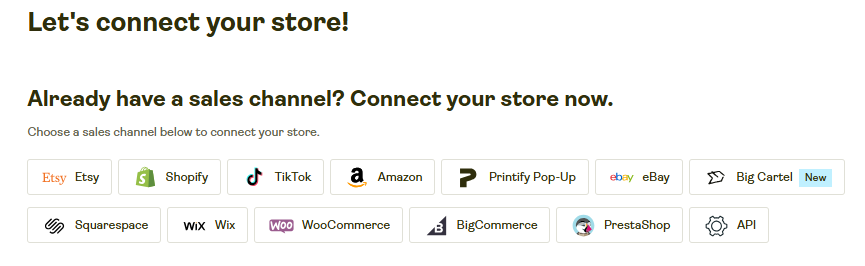
Printify will redirect you to Etsy’s login page. Sign into your Etsy account. If you don’t have an Etsy shop yet, this is also when you’d create one.
Etsy will then ask you to grant Printify permission to access your shop. Click “Grant Access” or “Authorize,” and that’s it. The two platforms begin syncing.
That sync is doing a lot of heavy lifting for you: it means every product you publish through Printify will appear directly in your Etsy shop, and every order your customer places will automatically land in Printify’s system for fulfillment.
The connection itself takes somewhere between 5 and 20 minutes to complete. Don’t panic if it doesn’t appear instantaneous. Go make a coffee and come back.
What the Integration Actually Automates
Once connected, Printify and Etsy talk to each other constantly. When you publish a new product from Printify, it shows up in your Etsy shop. When a customer buys something, Printify receives that order automatically and sends it to your print provider.
If you ever update your inventory or make changes to a product in Printify, those changes reflect on Etsy in real time. You’re not manually updating listings or copying order information anywhere.
For anyone who has tried to run an Etsy shop the old-fashioned way and spent hours every week on admin work, this automation is genuinely life-changing.
It’s the difference between a shop that runs with you and one that can run without you.
Step 3: Create Your First Product
Now you get to the fun part. Inside Printify, navigate to the product catalog. You’re looking at over 1,300 product options across categories like apparel, home decor, accessories, drinkware, outdoor gear, and tech accessories.
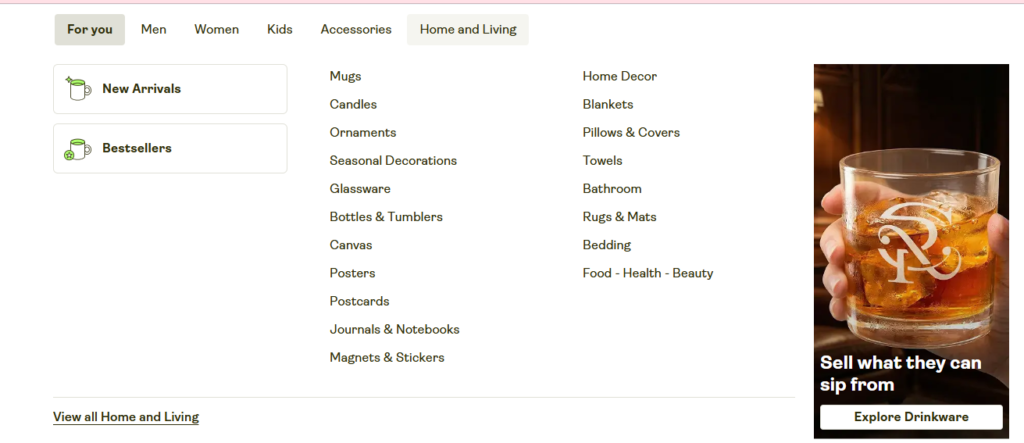
If you’ve never been in here before, set a timer because it’s easy to spend an hour just exploring.
You can filter products by price range, print provider location, available colors, and material type. Printify also shows you production costs and estimated profit margins right in the catalog so you can make informed decisions before you even start designing.
Finding the right products on Printify to sell can be overwhelming, but here is some guidance on which products to try out as a beginner.
How to Choose the Right Print Provider
One of the things that sets Printify apart from some other POD platforms is that multiple print providers often offer the same product, and you get to choose which one you work with.
Each provider has its own pricing, production speed, location, and quality rating.
Location matters more than people realize. If most of your customers are in the US, you want a US-based print provider so your shipping times are competitive.
Longer shipping windows cause bad reviews and return requests, and nobody wants that energy in their shop.
Also, even if you live outside of the US, you can ship to customer in the US using a US based print provider!
Check the provider ratings, read the customer feedback, and if you’re unsure, order a sample.
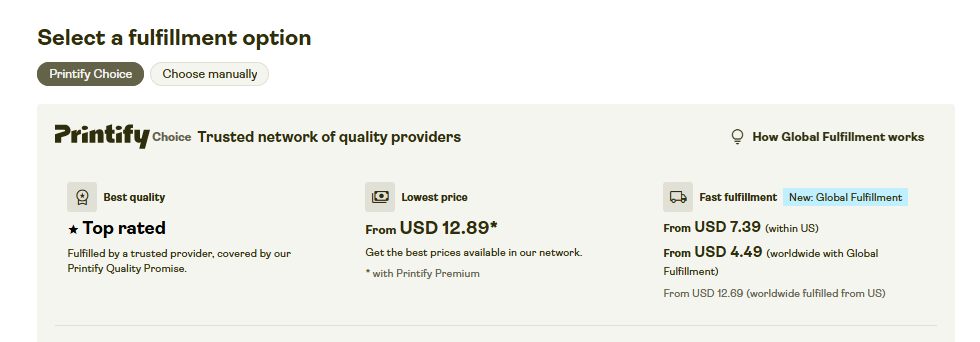
Important Tip: Printify has it’s own print provider brand called Printify Choice. The website will sometimes default to Printify Choice products. If you want to explore others, make sure you click “Choose Manually” when exploring ALL of the other print providers Printify has to offer.
Uploading Your Design
Printify gives you a few ways to get your design onto a product. You can upload an existing file, use Printify’s built-in Product Creator tool, or work with integrated tools like Canva or Printify’s AI image generator.
For file uploads, Printify specifies the exact pixel dimensions for every product in the catalog, so check those requirements before you upload anything.
If your image is too small or too low resolution, it won’t print well and you’ll end up with unhappy customers and a damaged shop reputation.
PNG files with transparent backgrounds are your best friend here. They give you clean placement on the product without any white box showing up around your design.
If you’re using Canva, make sure you’re exporting as PNG with transparency turned on. If you want more sophisticated AI-generated designs with accurate text rendering, Ideogram is genuinely great for that.
Your design quality is directly tied to your shop’s ability to convert browsers into buyers.
Once your design is uploaded, use the Printify mockup tool to position it on the product. You can place designs on the front, back, sleeves, and other locations depending on the product. The real-time preview shows you exactly how the final product will look.
Move things around, resize, and don’t settle for a placement that looks off. What you see in that preview is close to what your customer will receive.
Writing Your Product Title and Description
Etsy titles have a 140-character limit. Use that space intentionally. Your title should include the product type, the most relevant keywords for your niche, and something that makes it specific.
Your tags matter a lot more than your Title. Your title is what the customer will see so there is no need to keyword stuff. Make sure you stuff all of your keywords into the 13 tags that you get.
Your description needs to do more than list specs. Tell people what they’re getting, why they’ll love it, how it’s made, how to care for it, and what size options are available.
Write it like you’re explaining it to a friend, not like you’re filling out a form. Etsy shoppers read descriptions before buying, especially on higher-ticket items.
For deeper keyword strategy, tools like eRank and E-Hunt are genuinely useful. eRank helps you find low-competition, highly-searched keyword phrases. I have a very simple strategy for using eRank to find keywords to use in my shop.
E-Hunt’s Chrome extension lets you see actual sales numbers on individual Etsy listings so you can verify demand before you commit to a niche.

Step 4: Pricing Your Products Without Losing Money
Pricing is where a lot of new POD sellers make painful mistakes. They underprice because they’re scared of competing with cheap products, and then they wonder why they’re working so hard for almost nothing. Let’s talk about this clearly.
Your price needs to cover four things: the production cost, the shipping cost, Etsy’s fees, and your profit margin. Etsy takes a 6.5% transaction fee on every sale plus a $0.20 listing fee and roughly 3% plus $0.20 for payment processing.
Those fees add up, and if you didn’t account for them when you set your price, you’re eating them.
A Real Pricing Example That Actually Makes Sense
Say you’re selling a t-shirt. The production cost is $6. Shipping to a US customer is $4. You list the shirt for $19.99. Etsy’s transaction fees come to about $1.45 on that sale. Your net profit lands around $6.54 per shirt. That’s roughly a 40% margin, which is the default Printify recommendation and a healthy target for most products.
Printify defaults to a 40% profit margin when you’re setting prices inside the platform. That’s a reasonable starting point, but it’s not a universal rule.
In low-competition niches, you can push toward 45-50% without scaring buyers away. In high-competition niches with a lot of sub-$15 listings, you might need to be closer to 30-35% to stay competitive while still making money worth making.
People will pay for unique designs that they love! Don’t price based on what YOU would pay. Price based on what the market (your customer) will pay.
Don’t Forget Shipping Costs on Etsy
This one bites people constantly. Etsy requires you to set shipping costs in your shop settings. Your job is to make sure what you charge for shipping on Etsy matches what Printify actually charges to ship to your customer.
If you charge $3 for shipping on Etsy but Printify charges you $5, you just gave away $2 on that order. Multiply that by a hundred orders a month and you can feel how fast that adds up.
Before you publish any listing, go into Printify’s shipping settings for that product and check the actual shipping rates for your primary destination market. Set your Etsy shipping charge accordingly.
Some sellers build shipping costs into the product price and offer “free shipping” on Etsy, which can increase conversion rates since shoppers react strongly to the word free. Both approaches work; just do the math before you decide. I do not have free shipping turned on in my shop.
Step 5: Publish to Etsy and Manage Orders
When your product is designed, priced, and ready, click “Publish to Etsy” inside Printify. Within a few minutes, your listing will be live on Etsy and visible to shoppers. That’s it. You’ve officially launched a product.
Once the listing is up, the order fulfillment process runs on its own. A customer places an order on Etsy, that order lands in Printify automatically, Printify charges your card for production and shipping, the print provider makes and ships the item, and the customer receives a tracking number.
You get paid by Etsy. The whole thing happens without you manually touching a single part of the fulfillment process.
Mockup Images Matter More Than You Think
The default Printify mockups are fine as a starting point, but they’re not going to make your shop stand out.
Lifestyle mockups, where you can see the product being used in a real context, convert significantly better than flat product photos against a white background. You can purchase blank mockups of product on Etsy.
Use Canva to create custom mockup images, or use Ideogram for prompt-based mockup editing without needing Photoshop. Better images mean more clicks. More clicks mean more sales.
I find Ideogram so easy to use for creating mockups and also now for creating consistent design styles specific to your niche.
Is Printify Premium Worth It?
Printify offers a Premium membership at $39 per month. The main benefit is a 10-20% discount on production costs across most products. If you’re doing consistent volume, those discounts compound quickly and the membership more than pays for itself.
When I started my new shop inside my Etsy Strategy course and community (Freedom Unclocked), I did not initially turn on Printify Premium. But, I realized that if I sold 2-3 items a month, then premium was worth it as I was selling more expensive items.
Printify’s own calculator suggests Premium starts making financial sense around $2,000 in monthly sales. Below that threshold, the free plan is totally sufficient and you should focus your energy on getting more listings up and driving more traffic before adding any paid tools to your stack.
Premium also includes priority customer support and some advanced features around team management and branding, which matter more as your shop grows.
Common Mistakes to Avoid When You’re Just Starting
A lot of new sellers upload a handful of products, check their stats obsessively for two weeks, get discouraged by low traffic, and quit.
Don’t do this. Etsy SEO takes time to index your listings and build trust. The shops that grow are the ones that keep adding products, keep refining their SEO, and don’t read too much into the first few weeks of data.
Design placement errors are silent killers in POD: a logo that’s too small, a text design that runs off the edge, or a design that lands in the wrong spot on the garment will create refund requests and bad reviews fast.
Also, you must research what people are searching for on Etsy before you start listing. Use eRank to find low competition keywords that are being actively searched.
Then start designing after confirming demand for that keyword on Etsy.
If you need help finding those types of keywords, join my Opportunity Report for $9/month, where I do the research for you each week!
The Timeline to Expect
Creating your Printify account takes about five minutes. Connecting to Etsy takes another 10-20 minutes.
Creating your first product, including uploading a design, writing a title and description, and setting pricing, takes 30-45 minutes the first time.
It gets faster after that. Most sellers can knock out a new product in 15-20 minutes once they know the workflow. And, once you start to grow your shop, you will want to scale and hire a VA so you can focus on designs and strategy, or really whatever the heck you want to do with your time.
Plan for one to two hours to have your first product published and live. That’s it. That’s the whole barrier between where you are now and having a real, functioning Etsy POD shop. Two hours.

Want to Go Deeper and Build This Into a Real Business
Getting your first product up is a great start. But if you want to build a shop that actually generates consistent passive income from Etsy and gives you real location flexibility, you need a strategy that goes beyond the setup.
My Freedom Unclocked course walks you through the full process of building a profitable Etsy POD shop from scratch, including niche research, design strategy, SEO, and scaling. And, it includes a community called the Freedom Lounge, and so much more!
If you want to start with something free, grab the Self-Audit Cheat Sheet and use it to identify the gaps in your current shop setup.
And if you want a leg up on what’s actually selling right now, The Opportunity Report gives you current niche data you can actually act on.
Final Thoughts
Setting up Printify and connecting it to Etsy is genuinely one of the lower-barrier ways to start building income that doesn’t require you to be physically present to earn it. The setup process is straightforward, the tools are good, and the business model makes real sense once you understand how the money flows.
You don’t need to be a graphic designer. You don’t need to have a warehouse. You don’t need to already have an audience.
What you need is a willingness to put in a few focused hours, make smart decisions about pricing and niche, and keep building even when the results are slow at first.
The people who build successful Etsy POD shops are not smarter than you; they just started before they felt ready and kept going after the initial excitement wore off.
You’ve got the roadmap now. Go build the thing.
The Best SEO and Design Tools for an Etsy Shop:
These are the only tools I use for my shop!
Canva: Canva is the most amazing tool. It is user friendly, and always improving! The tools that Canva has have evolved so much since I first started using it in 2022 for the better. I use it almost everyday. I use it to create designs, to edit AI designs, and to create product mockups.
Ideogram: Ideogram is an AI design tool that generates high-quality graphics with exceptionally accurate text rendering, making it ideal for creating quote-based and typography-focused designs. I also use the prompt based editing for mockups, making it a wonderful alternative to Photoshop, which is expensive.
Midjourney: Midjourney is an AI image tool that blows my mind every time I use it. It takes some time to get the prompts down. Once you play with it, you will get better at creating images and art to include on your print on demand products.
E-Hunt: E-Hunt is fantastic for competitor research and some light keyword research. My favorite aspect of E-Hunt is the Chrome extension that allows you to see the sales amount for an individual item on Etsy. Check out this article to see an example.
eRank: eRank is an SEO data tool that also allows you to search the competition and will also give you key words for your Etsy listing. It is also a low cost tool that will help you find low competition and highly searched niches.
Printify: Printify is a print-on-demand (POD) service that allows individuals and businesses to create and sell custom-designed products without needing to manage inventory or handle fulfillment. I put my designs on products offered by Printify. When an item sells, Printify prints and ships to my customer.
📌 Share on Pinterest
Looking for more information on print on demand? Check out these articles:
- How to Achieve Financial Freedom and Build a Life You Choose
- How To Start an Ecommerce Business: My Print-on-Demand Guide
- Freedom Unclocked: What’s Inside and How To Put It To Work
- Etsy AI Policy 2026: What POD Sellers Can Actually Do
- Etsy Curtain Trends: 4 POD Home-Textile Ideas To Test
- Etsy Fall and Winter Seller Trends 2026: What POD Sellers Should List Now
- Gotcha Day Pet Gifts: What To List Now
- Etsy Digital Downloads Can Become Physical Prints: Should POD Sellers Worry?
- Honest ProfitTree Review: How I Research Products and Understand My Etsy Profit
- Etsy POD Christmas Trends 2026: 7 Gift Ideas to Test Now
- Etsy POD Trends for Q4 2026: 3 Opportunities to Test Now
- Etsy Shared Access: How to Add Team Members to Your Shop
- Silly Goose Etsy Trend: POD Ideas to Test Now
- Memento Mori Gifts: The Best Etsy POD Ideas to Test
- Etsy Trends Search: Nature Journaling Gifts What to List Now
- Etsy Live Preview for Custom Listings: The Ultimate Guide to Setting It Up
- Calculating Etsy Fees for POD Sellers: Your Ultimate Guide
- Etsy Fall Home Decor Trends: What To List Now
- Etsy v Shopify for Print on Demand: Which One is Actually Right For You?
- The Ideogram Background Remover is Here
- Etsy’s Personalization Update: What POD Sellers Need to Know
- How to Price Print on Demand Products on Etsy
- Lifestyle By Design: The Ultimate Inspiration
- The Best Print on Demand Products to Sell on Etsy
- Etsy Tags: The Complete Guide to SEO Visibility
- Ideogram Custom Models: Game Changer For Print on Demand
- The Best AI Image Generators for Etsy POD Sellers
- Printify’s New Multi-Product Listing: Game Changer for Esty POD Sellers
- How I Retired at 42: My Story and Best Advice
- ProfitTree vs. eRank vs EverBee vs Alura: Which Etsy Tool Is Best?
- The Be Do Have Mindset: The Best Way to Thrive on Etsy
- Etsy’s New Review Ratings Calculation: What Print on Demand Sellers Need to Know (And What Etsy Isn’t Saying)
- How to Scale Your Etsy Print on Demand Shop
- Etsy Seller Trend Report Spring and Summer 2026: What POD Sellers Need to Know
- Passive Income for Artists: How to Sell Your Art on Etsy with Print on Demand
- How to Get Vela and Finally Scale Your Etsy Print on Demand Shop Like a CEO
- Closing a Chapter in Life: Leaving Burnout Behind And Starting Over Abroad
- How A Multi Six-Figure Shop Owner Tells You How To Use eRank for Etsy Print on Demand
- eRank vs Etsy Marketplace Insights: Which SEO Tool Is Best?
- Etsy Spring Trends for 2026: The Best Post-Christmas Boost
- The Best Etsy Print on Demand Course And Why
- Ideogram’s Prompt Based Editing Makes It One of The Best Mockup Creation Tools for Etsy POD Sellers
- Is Etsy Still Worth It in 2026? An Honest Answer From Six-Figure Seller
- The Best Art Prompt Generator for Etsy POD Sellers
- Etsy Trends for 2026: The Ultimate Guide for POD Sellers on How to Turn Pinterest’s Predictions Into Sales
- Amazon Print on Demand Opens New Income Stream for Sellers
- Print on Demand Market Growth is Booming: How to Ensure Your Etsy Shop Will Too
- Etsy Trending Searches 2026: What Buyers Want Right Now (And How POD Sellers Can Cash In)
- Amazon Handmade vs Etsy: Which Platform Is Better for Handmade Sellers?
- What Is Faire? Guide for Etsy POD Sellers
- Is Etsy Plus Worth It? An Honest Breakdown From a Multi 6-Figure Etsy Seller
- How Many Listings Should I Have on Etsy?
- How to Use Midjourney Privately
- How to Use the Midjourney Seed Parameter for Consistent Print-on-Demand Designs
- How to Use Midjourney Stylize for Better Design Results
- How to Use Etsy Marketplace Insights
- Should I Change My Etsy Titles?
- Etsy vs Redbubble: Which Platform Is Better?
- Are Print On Demand Candles Profitable on Etsy?
- Etsy Print on Demand Income Report: April 2025 ($6K+)
- Print on Demand Stickers on Etsy: Are They Profitable?
- $300K+ Passive Income Etsy Shop: My Best Go-To Tools
- Is eRank Worth It? Review From a 6-figure Etsy Seller
- Etsy Print on Demand Income Report: March 2025 ($8K+)
- How to Achieve Location Independence with Etsy Print on Demand
- Etsy Print on Demand Income Report: February 2025 ($7K+)
- The Best Tools for Etsy Sellers
- Is Print on Demand Profitable?
- Are Etsy Ads Worth It?
- Etsy Print on Demand Income Report: January 2025 ($10K+)
- Etsy Trending Searches in 2026: Plus How to Use Them to Boost Sales
- Etsy Print on Demand Income Report: December 2024 ($28K+)
- The Ultimate Etsy Print-on-Demand: Step-by-Step Beginners Guide
- Etsy Print on Demand Income Report: November 2024 ($21K+)
- EtsyHunt Review: A Tool for Etsy Print on Demand Sellers
- Etsy Print-On-Demand Income Report for October 2024 ($11K)
- Etsy Print on Demand Income Report: September 2024 ($12K+)
- Etsy Print on Demand Income Report: August 2024 ($13K+)
- Quarterly Etsy Income Report: Over $18,000 in Three Months (Q2 – 2024)
- How to Find High-Demand, Low-Competition Etsy Niches
- Etsy Trending Niches: Boost Sales with Print on Demand
- Quarterly Etsy Income Report: Over $20,000 in Three Months (Q1 – 2024)
- Side Hustle: Can You Really Make $2200 a Month on Etsy?
- How To Get Found On Etsy: My First Year on Etsy
- How to Achieve Financial Freedom and Build a Life You Choose
- How To Start an Ecommerce Business: My Print-on-Demand Guide
- Freedom Unclocked: What’s Inside and How To Put It To Work
- Etsy AI Policy 2026: What POD Sellers Can Actually Do
- Etsy Curtain Trends: 4 POD Home-Textile Ideas To Test
- Etsy Fall and Winter Seller Trends 2026: What POD Sellers Should List Now
- Gotcha Day Pet Gifts: What To List Now
- Etsy Digital Downloads Can Become Physical Prints: Should POD Sellers Worry?
- Honest ProfitTree Review: How I Research Products and Understand My Etsy Profit
- Etsy POD Christmas Trends 2026: 7 Gift Ideas to Test Now
- Etsy POD Trends for Q4 2026: 3 Opportunities to Test Now
- Etsy Shared Access: How to Add Team Members to Your Shop
- Silly Goose Etsy Trend: POD Ideas to Test Now
- Memento Mori Gifts: The Best Etsy POD Ideas to Test
- Etsy Trends Search: Nature Journaling Gifts What to List Now
- Etsy Live Preview for Custom Listings: The Ultimate Guide to Setting It Up
- Calculating Etsy Fees for POD Sellers: Your Ultimate Guide
- Etsy Fall Home Decor Trends: What To List Now
- Etsy v Shopify for Print on Demand: Which One is Actually Right For You?
- The Ideogram Background Remover is Here
- Etsy’s Personalization Update: What POD Sellers Need to Know
- How to Price Print on Demand Products on Etsy
- Lifestyle By Design: The Ultimate Inspiration
- The Best Print on Demand Products to Sell on Etsy
- Etsy Tags: The Complete Guide to SEO Visibility
- Ideogram Custom Models: Game Changer For Print on Demand
- The Best AI Image Generators for Etsy POD Sellers
- Printify’s New Multi-Product Listing: Game Changer for Esty POD Sellers
- How I Retired at 42: My Story and Best Advice
- ProfitTree vs. eRank vs EverBee vs Alura: Which Etsy Tool Is Best?
- The Be Do Have Mindset: The Best Way to Thrive on Etsy
- Etsy’s New Review Ratings Calculation: What Print on Demand Sellers Need to Know (And What Etsy Isn’t Saying)
- How to Scale Your Etsy Print on Demand Shop
- Etsy Seller Trend Report Spring and Summer 2026: What POD Sellers Need to Know
- Passive Income for Artists: How to Sell Your Art on Etsy with Print on Demand
- How to Get Vela and Finally Scale Your Etsy Print on Demand Shop Like a CEO
- Closing a Chapter in Life: Leaving Burnout Behind And Starting Over Abroad
- How A Multi Six-Figure Shop Owner Tells You How To Use eRank for Etsy Print on Demand
- eRank vs Etsy Marketplace Insights: Which SEO Tool Is Best?
- Etsy Spring Trends for 2026: The Best Post-Christmas Boost
- The Best Etsy Print on Demand Course And Why
- Ideogram’s Prompt Based Editing Makes It One of The Best Mockup Creation Tools for Etsy POD Sellers
- Is Etsy Still Worth It in 2026? An Honest Answer From Six-Figure Seller
- The Best Art Prompt Generator for Etsy POD Sellers
- Etsy Trends for 2026: The Ultimate Guide for POD Sellers on How to Turn Pinterest’s Predictions Into Sales
- Amazon Print on Demand Opens New Income Stream for Sellers
- Print on Demand Market Growth is Booming: How to Ensure Your Etsy Shop Will Too
- Etsy Trending Searches 2026: What Buyers Want Right Now (And How POD Sellers Can Cash In)
- Amazon Handmade vs Etsy: Which Platform Is Better for Handmade Sellers?
- What Is Faire? Guide for Etsy POD Sellers
- Is Etsy Plus Worth It? An Honest Breakdown From a Multi 6-Figure Etsy Seller
- How Many Listings Should I Have on Etsy?
- How to Use Midjourney Privately
- How to Use the Midjourney Seed Parameter for Consistent Print-on-Demand Designs
- How to Use Midjourney Stylize for Better Design Results
- How to Use Etsy Marketplace Insights
- Should I Change My Etsy Titles?
- Etsy vs Redbubble: Which Platform Is Better?
- Are Print On Demand Candles Profitable on Etsy?
- Etsy Print on Demand Income Report: April 2025 ($6K+)
- Print on Demand Stickers on Etsy: Are They Profitable?
- $300K+ Passive Income Etsy Shop: My Best Go-To Tools
- Is eRank Worth It? Review From a 6-figure Etsy Seller
- Etsy Print on Demand Income Report: March 2025 ($8K+)
- How to Achieve Location Independence with Etsy Print on Demand
- Etsy Print on Demand Income Report: February 2025 ($7K+)
- The Best Tools for Etsy Sellers
- Is Print on Demand Profitable?
- Are Etsy Ads Worth It?
- Etsy Print on Demand Income Report: January 2025 ($10K+)
- Etsy Trending Searches in 2026: Plus How to Use Them to Boost Sales
- Etsy Print on Demand Income Report: December 2024 ($28K+)
- The Ultimate Etsy Print-on-Demand: Step-by-Step Beginners Guide
- Etsy Print on Demand Income Report: November 2024 ($21K+)
- EtsyHunt Review: A Tool for Etsy Print on Demand Sellers
- Etsy Print-On-Demand Income Report for October 2024 ($11K)
- Etsy Print on Demand Income Report: September 2024 ($12K+)
- Etsy Print on Demand Income Report: August 2024 ($13K+)
- Quarterly Etsy Income Report: Over $18,000 in Three Months (Q2 – 2024)
- How to Find High-Demand, Low-Competition Etsy Niches
- Etsy Trending Niches: Boost Sales with Print on Demand
- Quarterly Etsy Income Report: Over $20,000 in Three Months (Q1 – 2024)
- Side Hustle: Can You Really Make $2200 a Month on Etsy?
- How To Get Found On Etsy: My First Year on Etsy
