


This post may contain affiliate links. If you make a purchase through one of these links, I earn a small commission at no extra cost to you. Read my full disclosure here.
This ProfitTree review focuses deeply on the only three things I need from an Etsy tool: (1) help me understand what people are buying, (2) help me understand the competition/saturation, and (3) and help me understand the profit I actually keep when they buy from me.
But, those 3 things need to be easy to use, easy to understand, and connect to AI so that I can maximize my time for research and analysis.
For example, I want to dig deep into the data from my own shop without downloading a pile of spreadsheets first (which is what Etsy requires).
Being able to connect ProfitTree to ChatGPT or Claude has made that part considerably easier.
After building a multi-six-figure Etsy print-on-demand business, using my D.R.E.A.M. method, I care about research, amplifying what works, and managing profit (the R.E. and M in DREAM).
ProfitTree masters all three, and most importantly saves me time. I retired from corporate life on October 2025 and I want to enjoy my time with my family in Portugal. I don’t want to be tied to my computer working on my Etsy shops for 40 hours a week to be profitable!
Here is how I use it and why my preferred pairing is ProfitTree with Etsy Marketplace Insights.
Is ProfitTree Worth It?
Definitely, yes. ProfitTree’s biggest strengths are profit analysis and the connection that lets ChatGPT or Claude work with my shop data. Right now, I’m using ChatGPT, but the same exact analysis applies for Claude.
The financial displays make it easy to see where money is going.
The ChatGPT MCP connector lets me ask for a profit-and-loss breakdown, identify bestsellers, and explore which of my own products I should double down on without digging through Etsy’s spreadsheets myself.
I also find it useful for quickly researching products that appear to be selling now. That matters when I’m deciding what to design next, especially for seasonal products.
Would I use it as my only keyword research tool? Not currently. I pair it with Etsy Marketplace Insights for search data directly from Etsy.
If you already have an Etsy shop and need to understand your numbers, this is a tool I think deserves a serious look. If your main need is keyword research, read the section below on how I combine the tools before deciding.
What Is ProfitTree, and Who Created It?
ProfitTree is software for Etsy sellers that brings together shop financial reporting, product research, competitor research, and AI assistance.
Its current feature lineup includes a built-in assistant called Rupert and an MCP connection for external AI assistants.
I’ve mentioned MCP connections a few times. Let me quickly define it for you. It stands for Model Context Protocol, and simply put, it lets external AI assistants securely connect to and use ProfitTree’s data and tools.
Hannah Gardner, also known as Ecom Hannah, is ProfitTree’s founder.
Her experience as an ecommerce seller is the foundation for the product’s emphasis on understanding the business behind the sales.
To date, she has generated over $3.5 million in Etsy sales! So, yes please give me that same foundation in a tool!
You don’t need a print-on-demand business to use it. Handmade sellers and digital-product sellers also need to understand demand, costs, advertising, and profitability.
POD sellers have an especially practical use case because ProfitTree supports Printify and Printful cost integrations.

Connecting ProfitTree to ChatGPT Is My Favorite Feature
Most of us have asked ChatGPT for business advice. The usefulness changes when it can retrieve relevant information about the business you’re asking about.
I’ve used the ProfitTree connection in ChatGPT to look for demand, ask for a profit-and-loss statement for the previous month, and identify my bestselling items and what I should sell more of.
I can do that inside the conversation without opening ProfitTree for every question.
Previously, doing this kind of analysis could mean downloading information into CSV files and supplying those files to ChatGPT.
Having the connection removes that preparation from the tasks I’ve been using it for. I can spend more of my attention on the answer and what to do with it.
More importantly, a lot of us sellers, including those inside my community struggle with learning all of the features inside of a tool.
By connecting it to ChatGPT, you can use simple language to ask for the best use cases, quick analysis, or summaries of features without being overwhelmed!
What the MCP Connection Can Access
You do not need to understand the technical MCP standard to understand the benefit: you authorize access, then ask questions in ordinary language.
The ProfitTree permission screen I captured says ChatGPT can research Etsy products, shops, and keywords using ProfitTree data. It also says it can view my shop’s sales, orders, ads, product costs, and insights.
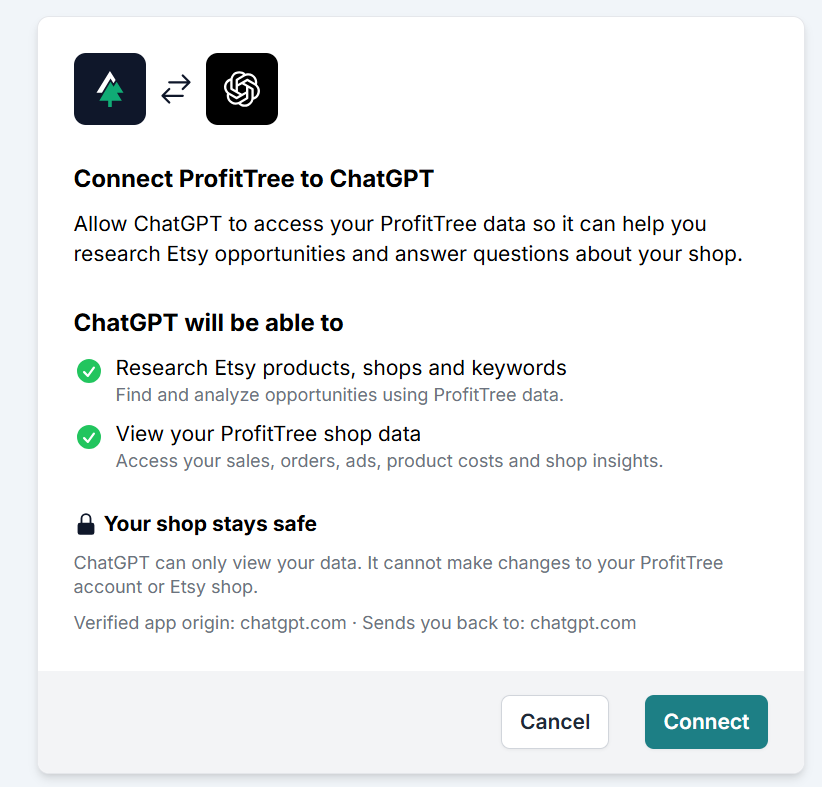
That last detail matters. The permission screen describes this connection as read-only. It can help me analyze information; it cannot make changes to my ProfitTree account or Etsy shop through the access shown here.
What Setup Was Like for Me
I found the ChatGPT setup very easy. I followed the instructions supplied by ProfitTree, added the MCP connection details, and completed the authorization.
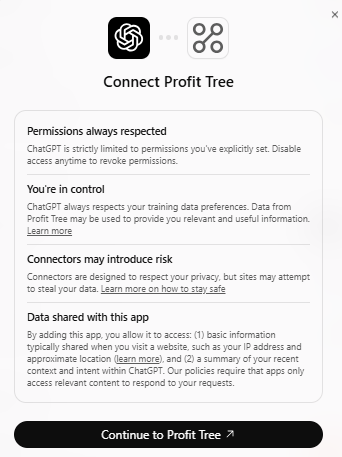

ProfitTree also provides connection instructions for Claude. My firsthand examples in this review are from ChatGPT, but they are largely interchangeable.
Rupert, the assistant inside ProfitTree, is a separate way to use its AI features; you don’t need to confuse the built-in assistant with the external connection.
An AI-generated answer still deserves a check. I want it to tell me the period it analyzed, which numbers it used, and whether costs are missing. A useful answer makes the reasoning easier to inspect.
Product Research: ProfitTree’s Flagship Feature
Before I design a product, I want to know whether people are interested in buying something like it. Research is the cornerstone of what I teach, and this is where ProfitTree deserves attention.
Its product research features help you look beyond a listing’s lifetime performance and investigate what is happening more recently.
ProfitTree highlights cart activity, sales over the last 24 hours, and views over the last 24 hours.
Together, those signals give you the best starting point for deciding how to structure your designs and choose your product to sell.
Look at Carts, Recent Sales, and Views Together
Cart activity shows interest. When a product is appearing in shoppers’ carts, that tells me people are considering it. The indicates DEMAND. That this product is actually something people want to spend their money on. You can’t ignore that as a seller.
Sales over the last 24 hours help put that interest into context. A product might have impressive historical sales without being something buyers want today. Recent sales activity is an important indicator for what is trending right now.
Views over the last 24 hours show recent attention. Views alone would not convince me to create a product. I want to consider them alongside cart activity and recent sales.
Research Directly on Etsy With the Chrome Extension
ProfitTree’s Chrome extension includes Etsy Radar, which brings listing and shop research directly into your on page Etsy research.
This is another one of my favorite features because I can quickly scan Etsy’s page and see what is in demand without having to click into each individual listing. And if you know me, I love any tool that saves me time.
This feature is also incredibly helpful because you will want to study the product itself: the design, the personalization options, the intended customer, and how the seller presents it.
You can do that all on the page and get a quick sense of what is selling, and what is not. You’ll go away knowing exactly what to focus on and what to ignore.
Seeing research data alongside the visual details of the product mockups helps connect the demand signals with the creative decisions.
How This Fits the Way I Research Products
I recently started early research on Christmas blankets. I wanted to understand what people were buying and which design styles were getting attention. ProfitTree made it incredibly easy to find products worth studying.
I don’t need a listing to be brand new or come from a small shop for it to interest me.
What matters to me is whether there is demand now. Then I can think about how to create my own original, creative interpretation for a particular buyer.
Once I find an idea worth pursuing, my next question is whether I can sell it at a price that leaves enough profit. That is where ProfitTree’s profit tracking becomes especially useful.
Profit Tracking: Seeing What You Actually Keep
Print-on-demand margins can be tight. A busy shop can generate plenty of orders while production, shipping, fees, and advertising absorb more money than the seller realizes.
This is where ProfitTree works particularly well for me. I don’t have a dramatic story about discovering that one product was secretly losing money.
My experience is more practical: the visual breakdown helps me understand the gaps across my shop, particularly around shipping costs.
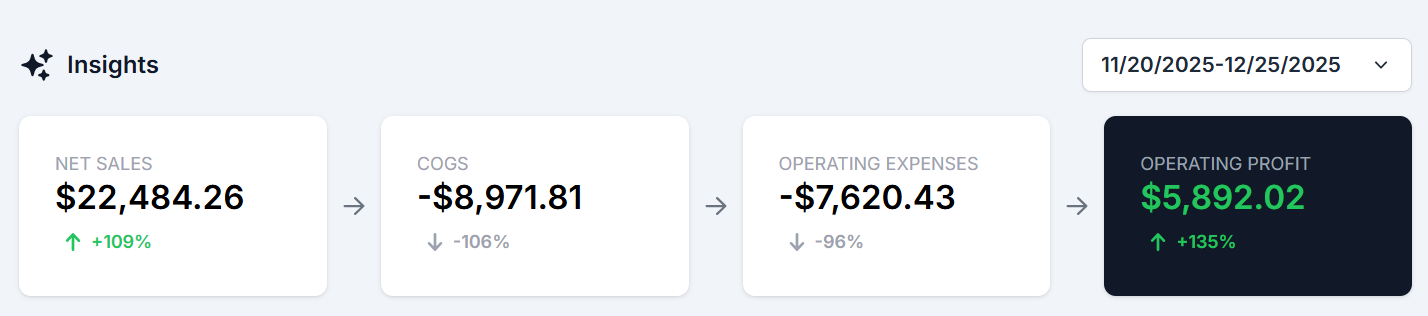
That screenshot is a useful example of why sales alone don’t tell the whole story. It shows a specific historical period, not a typical month or a promise of what another seller will earn.
The next view makes the individual costs easier to understand. Shipping is a substantial part of the breakdown, alongside production costs, Etsy fees, and ads.
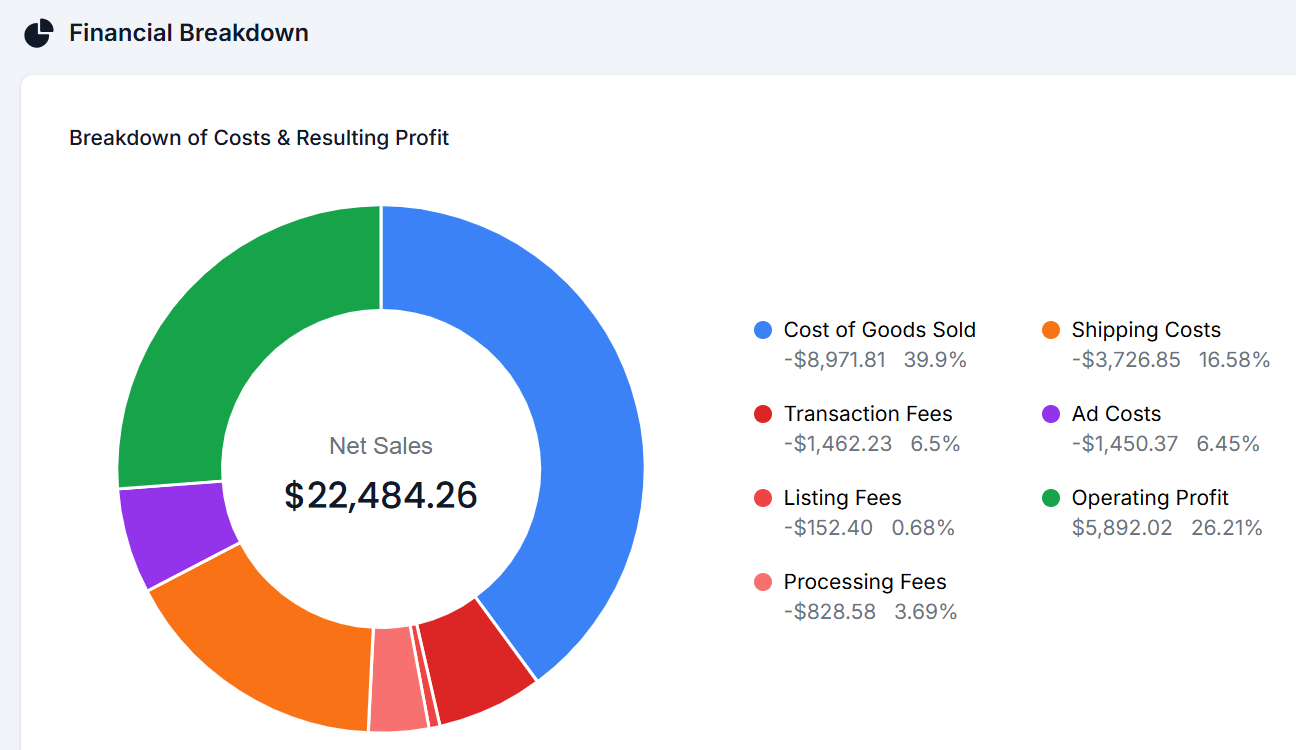
For me, this makes it easier to evaluate whether I should pass more shipping expense to the buyer or increase the item price to account for higher shipping costs. It gives me a clear place to start asking better questions.
If you’re still working through the basics of calculating Etsy fees for POD products, getting those costs straight is part of making any profit report useful. A missing production cost does not disappear because the dashboard looks polished.
ProfitTree’s reporting documentation also distinguishes between reports. For example, its Product Reports describe operating profit before advertising and indirect expenses.
Don’t assume a product-row margin includes exactly the same costs as a shop-level dashboard. Check the definition before comparing them. ProfitTree explains those metrics here.
Pricing for Profit Without Racing Competitors to the Bottom
Competitor prices provide context, but another seller’s price doesn’t tell me what their costs are or whether their business is profitable.
I want to charge a price that leaves enough profit and that the market will support. That includes looking at the actual selling price after discounts, the shipping charged to the customer, and what I pay to produce and fulfill the order.
One signal I watch is whether the share I keep as operating profit is improving. I also want to look at total profit dollars. A higher margin percentage is less exciting if the shop’s total earnings fall sharply.
ProfitTree gives me a more useful starting point for this than looking at sales alone.
Connected AI can then help compare scenarios, provided it uses complete costs and labels its assumptions. It cannot know in advance exactly how customers will respond to a price increase.
My guide to pricing print-on-demand products on Etsy covers the broader thinking. The tool helps you apply that thinking to the numbers in your own business.
Researching Products That Are Selling Right Now
A recent example for me was Christmas blankets. I wanted to understand what people were buying, what designs were working, and where I could bring a different creative perspective.
ProfitTree made it easy to find examples of what is in demand.
Those are two related research questions: what language are people searching, and what products are attracting buying activity? I want both perspectives before deciding what to make.
If it’s selling now, I’m interested. I also look at cart activity as an additional signal of interest (remembering that a cart is not a completed purchase).
This is part of the research behind finding an Etsy niche worth pursuing. Seeing demand is useful evidence. It still takes judgment to decide what you can contribute. ProfitTree makes this incredibly fast an easy.
This saves me tons of research time each week, when I can go into ChatGPT and ask it to pull the bestselling products in a specific niche, and analyze why they are selling and how can I put a creative spin on those products to develop new ones.
THIS WOULD TAKE ME HOURS AND HOURS BEFORE! It can now be done in literal minutes.
Why I Pair ProfitTree With Etsy Marketplace Insights
My preferred pairing is ProfitTree with Etsy Marketplace Insights because they help me answer different questions.
Marketplace Insights provides Etsy’s first party search data. Etsy says you can use it to explore search terms, related searches, and the number of searches and listings for the period shown.
That is my direct source for checking what shoppers are searching for. See Etsy’s explanation of Marketplace Insights.
ProfitTree adds product and competitor research, financial reporting, and the ability to ask connected AI questions about my shop. Its keyword features are useful to explore, but I don’t treat them as a direct feed of Marketplace Insights data.
If you’re unfamiliar with Etsy’s tool, start with my walkthrough of how I use Etsy Marketplace Insights.
However, Etsy’s Marketplace Insights has its own limitations:
- If you are on the free plan, you are limited to 15 searches a month
- The related searches that it provides are not great at the moment, so you are left manually searching tons of keywords at once
- There is no MCP or AI connection. Although you can get an Etsy API, that access does not provide any connection to Etsy’s keyword search data
- It will not save you time or give you any analysis tailored to your shop
Amplifying What Is Already Working
One of the things I teach in my community Freedom Unclocked is to pay attention to what is already working before chasing an entirely unrelated idea. An existing seller can have useful evidence sitting in their own shop.
I’ve asked ChatGPT through ProfitTree which items are selling best and what I should double down on. That gives me a starting point for thinking about amplification: which themes, buyers, or products deserve more attention?
I still bring the creative judgment. A bestseller does not automatically prove that every variation will sell. But a related idea grounded in actual customer response is worth examining.
It also helps to compare sales with profitability. A product can be popular and still need a pricing adjustment before it makes sense to expand it. That connection between research and managing the business is part of why I like this tool.
Three ProfitTree Prompts to Try in ChatGPT or Claude
These are suggested prompts based on the decisions I want to make according to my strategy.
Start each with: “Use my connected ProfitTree data.”
Find Products Worth Researching
Find Christmas blanket listings with recent buying activity over the latest available period. Show listing links, prices, available sales estimates, and cart activity separately. Include established listings as well as new ones. Identify recurring themes and suggest differentiated ideas worth investigating. Give me phrases to validate in Etsy Marketplace Insights without inventing search volumes.
Replace Christmas blankets with your own product category. The goal is a manageable set of candidates and a clear explanation of why they deserve a closer look.
Identify What to Amplify
Compare my shop’s last 30 days with the previous 30 days. Identify three products or themes worth amplifying based on sales, profit, and recent momentum. Explain the evidence and flag missing costs. Suggest related product or design ideas for the same customer, separating proven results from ideas that still need testing.
Read the reasoning before acting on the suggestions. If the comparison includes a holiday spike or very few orders, that should affect how much confidence you place in it.
Find Shipping and Pricing Gaps
Review my last complete month for shipping and pricing gaps. Where available, compare shipping collected with fulfillment shipping costs. Identify products worth reviewing and model charging more for shipping versus increasing the item price. Show profit dollars and margin, explain which costs are included, and do not assume sales volume will remain unchanged.
This is the kind of analysis that connects directly to my own experience with ProfitTree. I want help seeing where to investigate and comparing options before making a decision.
Who Can Benefit From ProfitTree?
Print-on-Demand Sellers
POD sellers have production and shipping costs attached to every order. ProfitTree’s Printify and Printful integrations can reduce manual cost entry.
Correct product matching still matters, particularly across sizes, colors, and other variations. ProfitTree explains that consistent SKUs support automatic COGS matching and grouping across listings. Read its SKU guidance.
Digital-Product Sellers
A digital download may have little fulfillment cost, but Etsy fees, discounts, advertising, and business expenses still affect what you keep. Research and competitor analysis can also help you evaluate product directions.
I would use the financial side to examine the economics of low-priced downloads and bundles, while entering relevant costs accurately.
Handmade Sellers
For handmade products, materials and labor need attention alongside fees and shipping. The software cannot infer every cost of making your product. The useful starting point is a reliable cost setup, followed by research and reporting that helps you decide where to focus.
ProfitTree Pricing and What to Check Before Upgrading
ProfitTree offers a Free plan and annual-billing equivalents of $5.99 per month for Starter, $17.99 for Growth, and $29.99 for Pro.
The Free plan lists MCP access and seven days of profit history. Starter lists 90 days, Growth one year, and Pro all-time history plus unlimited Etsy shops.
Access and history limits matter: asking for last month’s analysis requires a plan that provides that data. Check the current plan details before choosing.
I would begin with the questions you actually need answered. Test the workflow, check the numbers, and then pay for the history and features you need.
What I Would Keep in Mind
ProfitTree has not replaced Etsy Marketplace Insights for me, but the combination of both is very powerful.
Financial reporting also requires accurate costs. International sellers should check currency compatibility and VAT handling before relying on the totals.
ProfitTree documents specific limitations for these setups. Review the international reporting guidance.
Finally, I would use connected AI as an analyst whose work I can inspect. Ask what it used, check a few figures against the source, and make sure the recommendation fits your products and customers.
Final Thoughts
ProfitTree is the strongest tool I’ve used for understanding profit and conducting a full sales analysis on my own shop.
Its visual financial breakdown makes costs easier for me to evaluate, and the ChatGPT connection makes it easier to ask useful questions about the business without preparing spreadsheets first.
Product research adds another reason to use it. I can quickly investigate what appears to be selling, bring my own creative perspective, and then check search demand in Etsy Marketplace Insights.
My first-week recommendation is simple: connect your shop, check your costs, and ask for an audit of what is selling, what deserves amplification, and where pricing or shipping needs attention. Then choose one useful action from the findings.
Explore ProfitTree’s Free Plan and see how clearly it helps you understand your own shop.
The Best Resources for Your Print on Demand Business:
These are the resources I use for my multi six-figure Print on Demand business!
Canva: Canva is the most amazing tool. It is user friendly, and always improving! The tools that Canva has have evolved so much since I first started using it in 2022 for the better. I use it almost everyday. I use it to create designs, to edit AI designs, and to create product mockups.
Ideogram: Ideogram is an AI design tool that generates high-quality graphics with exceptionally accurate text rendering, making it ideal for creating quote-based and typography-focused designs. I also use the prompt based editing for mockups, making it a wonderful alternative to Photoshop, which is expensive.
E-Hunt: E-Hunt is fantastic for competitor research and some light keyword research. My favorite aspect of E-Hunt is the Chrome extension that allows you to see the sales amount for an individual item on Etsy. Check out this article to see an example.
eRank: eRank is an SEO data tool that also allows you to search the competition and will also give you key words for your Etsy listing. It is also a low cost tool that will help you find low competition and highly searched niches.
Printify: Printify is a print-on-demand (POD) service that allows individuals and businesses to create and sell custom-designed products without needing to manage inventory or handle fulfillment. I put my designs on products offered by Printify. When an item sells, Printify prints and ships to my customer.
ProfitTree: is the tool I use for profit analysis and AI-powered analysis of all of my Etsy shops. I use ProfitTree’s MCP connect to ChatGPT/Codex to my account and can run all sorts of analyses using my own data! I can even do demand research all inside ChatGPT (also works inside Claude).
AnywherePOD: AnywherePOD is the tool I use for automation and diving into personalization. I can bulk upload products to Printify, which is a game changer. AnywherePOD also has an AI Assistant that can bulk upload designs, multi-design and multi-variant listings! If you want to list and grow faster, you need AnywherePOD.
Vela: Vela is the bulk editing tool I use to manage hundreds of Etsy and Shopify listings without losing my mind. You can update videos, photos, titles, tags, descriptions, and prices across your entire shop in minutes, and your VA can build listings inside Vela without needing your Etsy login. Read more about Vela here.
Shopify: Shopify is what I recommend when you are ready to scale beyond Etsy and diversify where your products sell. The fees are lower, you own your customer data (emails), and it integrates directly with Printify and Vela. It is the easiest way to build a standalone storefront that you control. Read more about Etsy v Shopify here.
FAIRE: FAIRE is the wholesale marketplace I use to sell my products to retail, brick and mortar stores. If you want to scale your shop and add a wholesale revenue stream to your POD business, FAIRE is a great option. Read more about FAIRE here.
📌 Share on Pinterest

Looking for more information on print on demand? Check out these articles:
- How to Achieve Financial Freedom and Build a Life You Choose
- How To Start an Ecommerce Business: My Print-on-Demand Guide
- Freedom Unclocked: What’s Inside and How To Put It To Work
- Etsy AI Policy 2026: What POD Sellers Can Actually Do
- Etsy Curtain Trends: 4 POD Home-Textile Ideas To Test
- Etsy Fall and Winter Seller Trends 2026: What POD Sellers Should List Now
- Gotcha Day Pet Gifts: What To List Now
- Etsy Digital Downloads Can Become Physical Prints: Should POD Sellers Worry?
- Etsy POD Christmas Trends 2026: 7 Gift Ideas to Test Now
- Etsy POD Trends for Q4 2026: 3 Opportunities to Test Now
- Etsy Shared Access: How to Add Team Members to Your Shop
- Silly Goose Etsy Trend: POD Ideas to Test Now
- Memento Mori Gifts: The Best Etsy POD Ideas to Test
- Etsy Trends Search: Nature Journaling Gifts What to List Now
- Etsy Live Preview for Custom Listings: The Ultimate Guide to Setting It Up
- Calculating Etsy Fees for POD Sellers: Your Ultimate Guide
- Etsy Fall Home Decor Trends: What To List Now
- Etsy v Shopify for Print on Demand: Which One is Actually Right For You?
- The Ideogram Background Remover is Here
- Etsy’s Personalization Update: What POD Sellers Need to Know
- How to Price Print on Demand Products on Etsy
- Lifestyle By Design: The Ultimate Inspiration
- How to Set Up Printify Step-By-Step: The Ultimate Guide
- The Best Print on Demand Products to Sell on Etsy
- Etsy Tags: The Complete Guide to SEO Visibility
- Ideogram Custom Models: Game Changer For Print on Demand
- The Best AI Image Generators for Etsy POD Sellers
- Printify’s New Multi-Product Listing: Game Changer for Esty POD Sellers
- How I Retired at 42: My Story and Best Advice
- ProfitTree vs. eRank vs EverBee vs Alura: Which Etsy Tool Is Best?
- The Be Do Have Mindset: The Best Way to Thrive on Etsy
- Etsy’s New Review Ratings Calculation: What Print on Demand Sellers Need to Know (And What Etsy Isn’t Saying)
- How to Scale Your Etsy Print on Demand Shop
- Etsy Seller Trend Report Spring and Summer 2026: What POD Sellers Need to Know
- Passive Income for Artists: How to Sell Your Art on Etsy with Print on Demand
- How to Get Vela and Finally Scale Your Etsy Print on Demand Shop Like a CEO
- Closing a Chapter in Life: Leaving Burnout Behind And Starting Over Abroad
- How A Multi Six-Figure Shop Owner Tells You How To Use eRank for Etsy Print on Demand
- eRank vs Etsy Marketplace Insights: Which SEO Tool Is Best?
- Etsy Spring Trends for 2026: The Best Post-Christmas Boost
- The Best Etsy Print on Demand Course And Why
- Ideogram’s Prompt Based Editing Makes It One of The Best Mockup Creation Tools for Etsy POD Sellers
- Is Etsy Still Worth It in 2026? An Honest Answer From Six-Figure Seller
- The Best Art Prompt Generator for Etsy POD Sellers
- Etsy Trends for 2026: The Ultimate Guide for POD Sellers on How to Turn Pinterest’s Predictions Into Sales
- Amazon Print on Demand Opens New Income Stream for Sellers
- Print on Demand Market Growth is Booming: How to Ensure Your Etsy Shop Will Too
- Etsy Trending Searches 2026: What Buyers Want Right Now (And How POD Sellers Can Cash In)
- Amazon Handmade vs Etsy: Which Platform Is Better for Handmade Sellers?
- What Is Faire? Guide for Etsy POD Sellers
- Is Etsy Plus Worth It? An Honest Breakdown From a Multi 6-Figure Etsy Seller
- How Many Listings Should I Have on Etsy?
- How to Use Midjourney Privately
- How to Use the Midjourney Seed Parameter for Consistent Print-on-Demand Designs
- How to Use Midjourney Stylize for Better Design Results
- How to Use Etsy Marketplace Insights
- Should I Change My Etsy Titles?
- Etsy vs Redbubble: Which Platform Is Better?
- Are Print On Demand Candles Profitable on Etsy?
- Etsy Print on Demand Income Report: April 2025 ($6K+)
- Print on Demand Stickers on Etsy: Are They Profitable?
- $300K+ Passive Income Etsy Shop: My Best Go-To Tools
- Is eRank Worth It? Review From a 6-figure Etsy Seller
- Etsy Print on Demand Income Report: March 2025 ($8K+)
- How to Achieve Location Independence with Etsy Print on Demand
- Etsy Print on Demand Income Report: February 2025 ($7K+)
- The Best Tools for Etsy Sellers
- Is Print on Demand Profitable?
- Are Etsy Ads Worth It?
- Etsy Print on Demand Income Report: January 2025 ($10K+)
- Etsy Trending Searches in 2026: Plus How to Use Them to Boost Sales
- Etsy Print on Demand Income Report: December 2024 ($28K+)
- The Ultimate Etsy Print-on-Demand: Step-by-Step Beginners Guide
- Etsy Print on Demand Income Report: November 2024 ($21K+)
- EtsyHunt Review: A Tool for Etsy Print on Demand Sellers
- Etsy Print-On-Demand Income Report for October 2024 ($11K)
- Etsy Print on Demand Income Report: September 2024 ($12K+)
- Etsy Print on Demand Income Report: August 2024 ($13K+)
- Quarterly Etsy Income Report: Over $18,000 in Three Months (Q2 – 2024)
- How to Find High-Demand, Low-Competition Etsy Niches
- Etsy Trending Niches: Boost Sales with Print on Demand
- Quarterly Etsy Income Report: Over $20,000 in Three Months (Q1 – 2024)
- Side Hustle: Can You Really Make $2200 a Month on Etsy?
- How To Get Found On Etsy: My First Year on Etsy
- How to Achieve Financial Freedom and Build a Life You Choose
- How To Start an Ecommerce Business: My Print-on-Demand Guide
- Freedom Unclocked: What’s Inside and How To Put It To Work
- Etsy AI Policy 2026: What POD Sellers Can Actually Do
- Etsy Curtain Trends: 4 POD Home-Textile Ideas To Test
- Etsy Fall and Winter Seller Trends 2026: What POD Sellers Should List Now
- Gotcha Day Pet Gifts: What To List Now
- Etsy Digital Downloads Can Become Physical Prints: Should POD Sellers Worry?
- Etsy POD Christmas Trends 2026: 7 Gift Ideas to Test Now
- Etsy POD Trends for Q4 2026: 3 Opportunities to Test Now
- Etsy Shared Access: How to Add Team Members to Your Shop
- Silly Goose Etsy Trend: POD Ideas to Test Now
- Memento Mori Gifts: The Best Etsy POD Ideas to Test
- Etsy Trends Search: Nature Journaling Gifts What to List Now
- Etsy Live Preview for Custom Listings: The Ultimate Guide to Setting It Up
- Calculating Etsy Fees for POD Sellers: Your Ultimate Guide
- Etsy Fall Home Decor Trends: What To List Now
- Etsy v Shopify for Print on Demand: Which One is Actually Right For You?
- The Ideogram Background Remover is Here
- Etsy’s Personalization Update: What POD Sellers Need to Know
- How to Price Print on Demand Products on Etsy
- Lifestyle By Design: The Ultimate Inspiration
- How to Set Up Printify Step-By-Step: The Ultimate Guide
- The Best Print on Demand Products to Sell on Etsy
- Etsy Tags: The Complete Guide to SEO Visibility
- Ideogram Custom Models: Game Changer For Print on Demand
- The Best AI Image Generators for Etsy POD Sellers
- Printify’s New Multi-Product Listing: Game Changer for Esty POD Sellers
- How I Retired at 42: My Story and Best Advice
- ProfitTree vs. eRank vs EverBee vs Alura: Which Etsy Tool Is Best?
- The Be Do Have Mindset: The Best Way to Thrive on Etsy
- Etsy’s New Review Ratings Calculation: What Print on Demand Sellers Need to Know (And What Etsy Isn’t Saying)
- How to Scale Your Etsy Print on Demand Shop
- Etsy Seller Trend Report Spring and Summer 2026: What POD Sellers Need to Know
- Passive Income for Artists: How to Sell Your Art on Etsy with Print on Demand
- How to Get Vela and Finally Scale Your Etsy Print on Demand Shop Like a CEO
- Closing a Chapter in Life: Leaving Burnout Behind And Starting Over Abroad
- How A Multi Six-Figure Shop Owner Tells You How To Use eRank for Etsy Print on Demand
- eRank vs Etsy Marketplace Insights: Which SEO Tool Is Best?
- Etsy Spring Trends for 2026: The Best Post-Christmas Boost
- The Best Etsy Print on Demand Course And Why
- Ideogram’s Prompt Based Editing Makes It One of The Best Mockup Creation Tools for Etsy POD Sellers
- Is Etsy Still Worth It in 2026? An Honest Answer From Six-Figure Seller
- The Best Art Prompt Generator for Etsy POD Sellers
- Etsy Trends for 2026: The Ultimate Guide for POD Sellers on How to Turn Pinterest’s Predictions Into Sales
- Amazon Print on Demand Opens New Income Stream for Sellers
- Print on Demand Market Growth is Booming: How to Ensure Your Etsy Shop Will Too
- Etsy Trending Searches 2026: What Buyers Want Right Now (And How POD Sellers Can Cash In)
- Amazon Handmade vs Etsy: Which Platform Is Better for Handmade Sellers?
- What Is Faire? Guide for Etsy POD Sellers
- Is Etsy Plus Worth It? An Honest Breakdown From a Multi 6-Figure Etsy Seller
- How Many Listings Should I Have on Etsy?
- How to Use Midjourney Privately
- How to Use the Midjourney Seed Parameter for Consistent Print-on-Demand Designs
- How to Use Midjourney Stylize for Better Design Results
- How to Use Etsy Marketplace Insights
- Should I Change My Etsy Titles?
- Etsy vs Redbubble: Which Platform Is Better?
- Are Print On Demand Candles Profitable on Etsy?
- Etsy Print on Demand Income Report: April 2025 ($6K+)
- Print on Demand Stickers on Etsy: Are They Profitable?
- $300K+ Passive Income Etsy Shop: My Best Go-To Tools
- Is eRank Worth It? Review From a 6-figure Etsy Seller
- Etsy Print on Demand Income Report: March 2025 ($8K+)
- How to Achieve Location Independence with Etsy Print on Demand
- Etsy Print on Demand Income Report: February 2025 ($7K+)
- The Best Tools for Etsy Sellers
- Is Print on Demand Profitable?
- Are Etsy Ads Worth It?
- Etsy Print on Demand Income Report: January 2025 ($10K+)
- Etsy Trending Searches in 2026: Plus How to Use Them to Boost Sales
- Etsy Print on Demand Income Report: December 2024 ($28K+)
- The Ultimate Etsy Print-on-Demand: Step-by-Step Beginners Guide
- Etsy Print on Demand Income Report: November 2024 ($21K+)
- EtsyHunt Review: A Tool for Etsy Print on Demand Sellers
- Etsy Print-On-Demand Income Report for October 2024 ($11K)
- Etsy Print on Demand Income Report: September 2024 ($12K+)
- Etsy Print on Demand Income Report: August 2024 ($13K+)
- Quarterly Etsy Income Report: Over $18,000 in Three Months (Q2 – 2024)
- How to Find High-Demand, Low-Competition Etsy Niches
- Etsy Trending Niches: Boost Sales with Print on Demand
- Quarterly Etsy Income Report: Over $20,000 in Three Months (Q1 – 2024)
- Side Hustle: Can You Really Make $2200 a Month on Etsy?
- How To Get Found On Etsy: My First Year on Etsy
