


This post may contain affiliate links. If you make a purchase through one of these links, I earn a small commission at no extra cost to you. Read my full disclosure here.
Ideogram custom models have just launched. And, let me tell you this new feature is amazing. I’m going to tell you exactly why that matters for your print on demand shop.
Let me set a scene for you. You’ve been grinding on your Etsy shop for months. You’ve found your niche, you’ve done the keyword research, you’ve uploaded a solid catalog of designs. You have sales, but you don’t know how to capitalize on them.
Here is where the problem lies for most sellers. Most sellers do nothing after getting sales. You have to Amplify those sales! I teach this in my D.R.E.A.M. method inside my community Freedom Unclocked.
You need to make more designs like the ones that sold! And, now with Ideogram custom models, you can do that AND each design that you make will have similar features to the ones that have already sold!
The Real Problem With Generic AI Image Generators
Here’s something nobody talks about enough in the Etsy POD space. Most AI image generators, even the good ones, were trained on an absolutely wild assortment of images scraped from the internet. Billions of them.
That data includes everything from Renaissance paintings to product photography to random blog graphics to fan art posted in 2009.
The result is a model that knows a little bit about everything and a lot about nothing specific.
When you type a prompt into one of these tools, it produces an image that sort of looks like what you asked for. Sometimes it even looks great.
But it doesn’t look like your designs it doesn’t have your aesthetic. It doesn’t carry your color language, your line weight preferences, your compositional instincts, or the specific aesthetic DNA you’ve been building over time.
A brand that looks like everyone else’s isn’t a brand. It’s just noise.
And here’s the kicker: Etsy’s algorithm rewards shops that build a recognizable aesthetic over time. Repeat customers, cohesive shops, and strong brand identity all contribute to the kind of long-term passive income you’re actually building toward.
So if your AI outputs have no consistent visual voice, you’re working against yourself every single time you upload a new design.
What Is the Ideogram Custom Model, Actually
Okay, let’s get into it. Ideogram already has a reputation for something specific that other AI image tools genuinely struggled with for years: legible text rendering.
If you’ve ever tried to get another AI generator to put readable words on an image, you know what I’m talking about.
The letters morph into something resembling cursive drawn by someone who just woke up. Ideogram cracked that problem early, and it became the tool that Etsy POD sellers who work in typography, quotes, and text-based designs rely on hard.
But the Ideogram custom model takes it significantly further.
The concept is straightforward. You upload between 15 and 100 images that represent your brand’s visual identity.
These should be your best-performing designs, your style references, your color palettes expressed visually, your product mockup styles, anything that captures what your shop looks and feels like.
I recommend to make one model for your designs specifically, and another model for your mockups or brand if you have one. That way, when you use the specific model, Ideogram will pull from your designs to make new ones. You want the model focused on exactly what you intend to generate in the future.
So mockups and designs together may muddy the model a bit.
Then, Ideogram then trains a model on those specific images, not the internet at large.
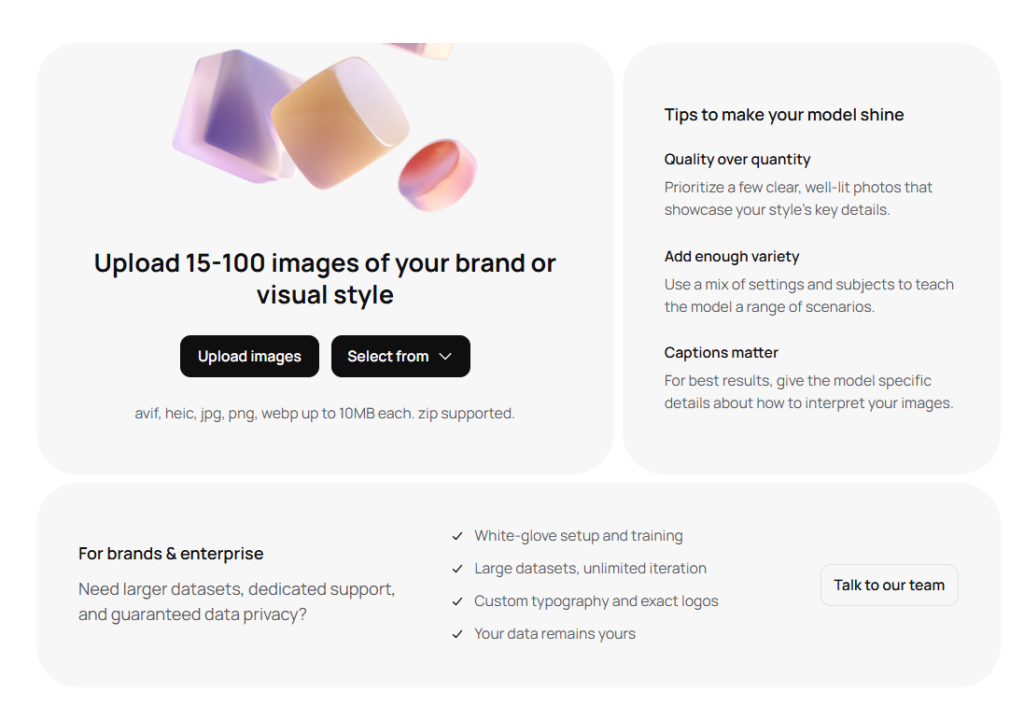
The result is a fine-tuned AI model that has learned your aesthetic. When you generate new images with it, the outputs carry your visual identity forward instead of pulling from some generic averaged-out internet style.
You’re not prompting an AI anymore. You’re prompting your brand.
That distinction sounds subtle, but for a POD seller trying to build a recognizable shop with cohesive product lines, it’s everything.
How the Training Process Actually Works
The training workflow is not complicated, and you don’t need a computer science degree or a GPU server sitting in your closet. Ideogram handles the infrastructure entirely.
You start in the Models tab on the Ideogram platform. You click the plus button to create a new model. Then you upload your images.
Ideogram automatically generates captions for each image you upload, and you can review and refine those captions before training begins.
That refinement step matters more than people expect.
The captions teach the model how to interpret your images, so if the auto-generated descriptions miss something important about your style, correcting them gives the model more accurate context to learn from.
Then you kick off training. Ideogram builds the model. You don’t wait on a GPU queue or manage any technical configuration. It happens in the background. It took mine about 2 hours to train on 53 images.
Once your custom model is ready, you select it when generating new images and start prompting.
You can also stack Style References and Color Palettes on top of your custom model outputs for even tighter brand control.
That layered approach, your trained model plus a specific color palette plus a style reference, is where things get really precise.
Why This Matters for Your Etsy POD Shop Specifically
Let’s bring this all the way back to your Etsy goals, because this isn’t just a fun technology experiment. This is a legitimate strategy for building a freedom-first business.
One of the biggest reasons Etsy shops plateau is inconsistency. A buyer finds one listing they love, clicks to your shop, and sees a random collection of designs that don’t visually relate to each other.
There’s no reason to follow, no reason to favorite the shop, no reason to come back. The browsing experience feels scattered.
A shop trained around a custom model solves this. Every new design you create pulls from the same visual language. Your shop starts to look intentional. That coherence builds trust, and trust on Etsy turns into return customers and word-of-mouth favorites.
Return customers on Etsy are the closest thing this platform has to actual passive income snowballing.
Beyond cohesion, there’s the speed factor. If you’re in a competitive niche like affirmations, cottagecore, or retro sports designs, the sellers who can generate on-brand content quickly have a real advantage.
When a trend pops up, you don’t want to spend three hours prompting a generic AI tool and getting outputs that don’t fit your shop’s aesthetic. You want to run a prompt through your trained model and get something that looks like it was made specifically for your catalog, because it was.
The Text Rendering Advantage for Quote Designs
Quote-based designs are one of the best-performing categories in Etsy POD. Mugs with affirmations, tote bags with funny sayings, wall art with motivational phrases.
The problem has always been getting AI-generated art to include readable, styled text without it turning into visual garbage.
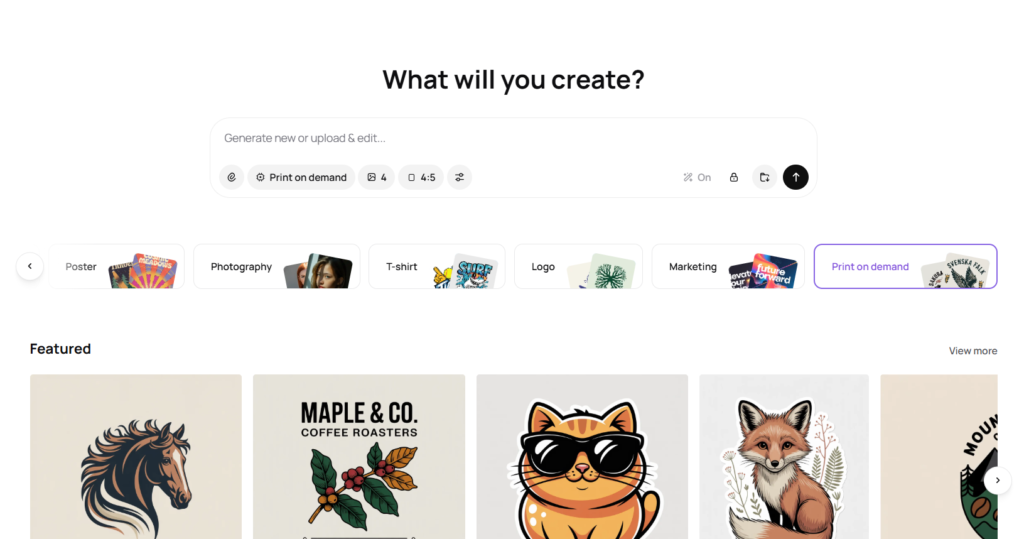
Ideogram built its reputation on solving exactly that. The base model already produces legible, stylistically appropriate text better than most tools on the market. When you layer a custom model on top of that foundation, you get legible text that also fits your brand’s typographic identity.
That’s a real competitive advantage in the quote design space. You can generate an entire cohesive collection of affirmation-based wall prints that all feel like they came from the same artist, with readable text, in the time it would take you to manually design two or three in Canva.
Why Ideogram’s Foundation Matters More Than You’d Think
Let me get a bit nerdy here. There are open-source alternatives to the Ideogram custom model, specifically something called LoRAs, which are lightweight fine-tuning methods that attach to open-source base models.
They’re similar in concept to what Ideogram offers. But they inherit every weakness of the base model they’re built on.
Open-source base models tend to have inconsistent text rendering, more generic compositional defaults, and limited ability to handle specific stylistic instructions reliably.
You can fine-tune a LoRA on your brand images, but if the underlying model produces shaky results, your fine-tuning is building on a shaky foundation.
Ideogram was founded by the researcher behind Google’s first text-to-image system. That specific background means the core model was built with a different priority structure: text accuracy, compositional control, and style fidelity.
A custom model trained on top of that foundation inherits those strengths.
The base model matters. A custom layer on a strong base gives you strong outputs. A custom layer on a weak base just gives you slightly more personalized weak outputs.
How to Get Started With Your Own Ideogram Custom Model
If you’re reading this and your shop already has a body of work you’re proud of, you’re closer to being ready than you think.
Start by pulling together 15 to 100 of your best existing designs. These should be images that genuinely represent what your shop is about, not your mediocre outputs from the early days, but the ones that have sales, views, and favorites (heaviest emphasis on sales).
If you’re brand new and don’t have that body of work yet, you can use style reference images that reflect the aesthetic you’re building toward, though training on your own original designs will always produce more personally tailored results.
Keep track of your designs that have sold or have views an favorites and build your model over time.
Pay attention during the caption refinement step. The captions aren’t just metadata; they’re how the model learns to associate your visual choices with words.
If your style involves a lot of warm terracotta tones and hand-drawn line work, make sure those details are reflected in your image captions. Be specific. Generality in captioning leads to generality in outputs.
Once your model is trained, spend time prompting systematically. Don’t just generate one image and call it done. Run the same prompt through several variations, look at what the model does with different phrasing, and identify its strengths and quirks. Every model has a personality, even custom ones.
The sellers who treat their custom model like a creative collaborator rather than a vending machine are the ones who build truly distinctive shops.
And then, when you’ve generated outputs you love, save them. The best ones can feed your next training round, making your model progressively sharper over time.
Stacking Tools for Full Brand Control
The Ideogram custom model doesn’t have to work alone. Ideogram’s platform lets you stack your custom model with Style References and Color Palettes, and that combination gives you a level of brand control that’s genuinely impressive for a no-code, no-infrastructure workflow.
Style References let you drop in a specific image whose aesthetic you want the model to reference during generation. Color Palettes lock in specific hex values or color groups.

When you combine those two layers with a model already trained on your brand, you’re essentially giving the AI three separate channels of brand instruction at once.
From a practical POD workflow standpoint, think about what that means. You could have a custom model trained on your botanical line, a color palette saved for your fall collection, and a style reference for a specific illustration weight, and generate an entire autumn botanical collection in an afternoon that is visually tight enough to launch as a product line.
For scaling your Etsy shop, that kind of speed and consistency is what separates shops that grow from shops that stay stuck.
You can pair this with Canva for any final design touches, mockup creation, or text overlays, and you’ve got a genuinely powerful production pipeline that doesn’t require outsourcing or a full design team.
Using the API for Serious Volume
This is for those a bit more advanced. If you’re at the stage where you’re running a high-volume print on demand shop, managing multiple shops, or selling digital designs, Ideogram also provides full API support for custom model training and generation.
You can create datasets, upload training images, kick off model training, and generate at scale all programmatically from your own infrastructure.
That means you can build a workflow where new designs are generated in bulk, reviewed, and pushed directly into your design pipeline with minimal hands-on time per image.
This is the kind of leverage that I love: building systems that generate output without requiring your constant manual input at every step.
I have multiple shops, a membership, this blog, two kids, a husband, and a retirement life to enjoy in Portugal! I NEED automation in my life and will definitely be utilizing Ideogram’s API for that reason. I already use it for batch design generation and creating Pinterest pins in bulk.
You’re not working more hours to produce more designs. You’re building a machine that produces designs while you sleep, or while you’re eating tacos in Mexico City, or wherever your freedom-first business takes you.
Real Talk: Is This Worth the Investment?
I know some of you are doing the mental math right now. Another tool. Another subscription. Another thing to learn. Custom models are available on the Pro ($60/mo.), Team ($20/mo. per user), and Enterprise plans ($TBD) (and also available via API).

Here’s my advice: if you’re in the early days of your shop and still figuring out your niche, the regular Ideogram tool is probably enough to start. Use it, learn how it works, generate consistently, and let your aesthetic develop organically. Get started for free.
You can use eRank to research low-competition niches and E-Hunt to scope out what’s actually selling on Etsy (in your chrome browser) before you invest in training a custom model on a niche you haven’t validated yet.
But if you have been in your shop long enough to know what your brand is, if you have a handful of designs that represent your aesthetic and you want to scale that aesthetic across hundreds of products, the custom model stops being a luxury and starts being a strategic asset.
The shops that will win on Etsy over the next few years are not the ones uploading the most generic AI art. They’re the ones that built a recognizable look, developed customer loyalty around that look, and scaled it intelligently. The Ideogram custom model is a real tool for getting there.
If you want a structured way to evaluate where your shop stands right now before deciding what to invest in, grab the Self-Audit Cheat Sheet. It’ll help you see your shop with clear eyes before you add anything new to your workflow.
Final Thoughts: Build a Brand, Not Just a Catalog
The Etsy POD space is more crowded than it’s ever been. That’s just the reality. But more crowded doesn’t mean harder to win in, it means that differentiation matters more than it used to.
The sellers who treat their shop as a brand with a real visual identity are going to stand apart from the sellers who are just uploading whatever the AI gives them that week.
The Ideogram custom model is a serious tool for building that kind of brand consistency. It trains on your images, learns your aesthetic, and generates new work that actually looks like it came from your shop.
That’s not a small thing. That’s the difference between a store that gets forgotten after one visit and a store that people come back to because it feels like something.
You’re building a freedom-first business. That means you’re playing a longer game than the person who uploads 500 generic designs and hopes something sticks. It means you’re building something with staying power, something that earns passive income from Etsy because people recognize and trust your work.
A custom-trained model isn’t just a design tool. It’s an investment in making your brand impossible to mistake for anyone else’s.
Start where you are. Train on what you have. Generate with intention. And let the machine carry your brand forward while you do the work that actually requires you.
If you’re ready to go deeper on building your Etsy shop as a real business, check out Freedom Unclocked for a full course and community built around growing a sustainable POD income.
And if design inspiration is where you get stuck, the Promptessa Unclocked Art Prompt Generator gives you a structured way to build your prompt library so you’re never staring at a blank screen wondering what to create next.
Keep building. Your shop is not done with you yet.
The Best SEO and Design Tools for an Etsy Shop:
These are the only tools I use for my shop!
Canva: Canva is the most amazing tool. It is user friendly, and always improving! The tools that Canva has have evolved so much since I first started using it in 2022 for the better. I use it almost everyday. I use it to create designs, to edit AI designs, and to create product mockups.
Ideogram: Ideogram is an AI design tool that generates high-quality graphics with exceptionally accurate text rendering, making it ideal for creating quote-based and typography-focused designs. I also use the prompt based editing for mockups, making it a wonderful alternative to Photoshop, which is expensive.
Midjourney: Midjourney is an AI image tool that blows my mind every time I use it. It takes some time to get the prompts down. Once you play with it, you will get better at creating images and art to include on your print on demand products.
E-Hunt: E-Hunt is fantastic for competitor research and some light keyword research. My favorite aspect of E-Hunt is the Chrome extension that allows you to see the sales amount for an individual item on Etsy. Check out this article to see an example.
eRank: eRank is an SEO data tool that also allows you to search the competition and will also give you key words for your Etsy listing. It is also a low cost tool that will help you find low competition and highly searched niches.
Printify: Printify is a print-on-demand (POD) service that allows individuals and businesses to create and sell custom-designed products without needing to manage inventory or handle fulfillment. I put my designs on products offered by Printify. When an item sells, Printify prints and ships to my customer.
📌Share on Pinterest

Looking for more information on print on demand? Check out these articles:
- Freedom Unclocked: What’s Inside and How To Put It To Work
- Etsy AI Policy 2026: What POD Sellers Can Actually Do
- Etsy Curtain Trends: 4 POD Home-Textile Ideas To Test
- Etsy Fall and Winter Seller Trends 2026: What POD Sellers Should List Now
- Gotcha Day Pet Gifts: What To List Now
- Etsy Digital Downloads Can Become Physical Prints: Should POD Sellers Worry?
- Honest ProfitTree Review: How I Research Products and Understand My Etsy Profit
- Etsy POD Christmas Trends 2026: 7 Gift Ideas to Test Now
- Etsy POD Trends for Q4 2026: 3 Opportunities to Test Now
- Etsy Shared Access: How to Add Team Members to Your Shop
- Silly Goose Etsy Trend: POD Ideas to Test Now
- Memento Mori Gifts: The Best Etsy POD Ideas to Test
- Etsy Trends Search: Nature Journaling Gifts What to List Now
- Etsy Live Preview for Custom Listings: The Ultimate Guide to Setting It Up
- Calculating Etsy Fees for POD Sellers: Your Ultimate Guide
- Etsy Fall Home Decor Trends: What To List Now
- Etsy v Shopify for Print on Demand: Which One is Actually Right For You?
- The Ideogram Background Remover is Here
- Etsy’s Personalization Update: What POD Sellers Need to Know
- How to Price Print on Demand Products on Etsy
- Lifestyle By Design: The Ultimate Inspiration
- How to Set Up Printify Step-By-Step: The Ultimate Guide
- The Best Print on Demand Products to Sell on Etsy
- Etsy Tags: The Complete Guide to SEO Visibility
- The Best AI Image Generators for Etsy POD Sellers
- Printify’s New Multi-Product Listing: Game Changer for Esty POD Sellers
- How I Retired at 42: My Story and Best Advice
- ProfitTree vs. eRank vs EverBee vs Alura: Which Etsy Tool Is Best?
- The Be Do Have Mindset: The Best Way to Thrive on Etsy
- Etsy’s New Review Ratings Calculation: What Print on Demand Sellers Need to Know (And What Etsy Isn’t Saying)
- How to Scale Your Etsy Print on Demand Shop
- Etsy Seller Trend Report Spring and Summer 2026: What POD Sellers Need to Know
- Passive Income for Artists: How to Sell Your Art on Etsy with Print on Demand
- How to Get Vela and Finally Scale Your Etsy Print on Demand Shop Like a CEO
- Closing a Chapter in Life: Leaving Burnout Behind And Starting Over Abroad
- How A Multi Six-Figure Shop Owner Tells You How To Use eRank for Etsy Print on Demand
- eRank vs Etsy Marketplace Insights: Which SEO Tool Is Best?
- Etsy Spring Trends for 2026: The Best Post-Christmas Boost
- The Best Etsy Print on Demand Course And Why
- Ideogram’s Prompt Based Editing Makes It One of The Best Mockup Creation Tools for Etsy POD Sellers
- Is Etsy Still Worth It in 2026? An Honest Answer From Six-Figure Seller
- The Best Art Prompt Generator for Etsy POD Sellers
- Etsy Trends for 2026: The Ultimate Guide for POD Sellers on How to Turn Pinterest’s Predictions Into Sales
- Amazon Print on Demand Opens New Income Stream for Sellers
- Print on Demand Market Growth is Booming: How to Ensure Your Etsy Shop Will Too
- Etsy Trending Searches 2026: What Buyers Want Right Now (And How POD Sellers Can Cash In)
- Amazon Handmade vs Etsy: Which Platform Is Better for Handmade Sellers?
- What Is Faire? Guide for Etsy POD Sellers
- Is Etsy Plus Worth It? An Honest Breakdown From a Multi 6-Figure Etsy Seller
- How Many Listings Should I Have on Etsy?
- How to Use Midjourney Privately
- How to Use the Midjourney Seed Parameter for Consistent Print-on-Demand Designs
- How to Use Midjourney Stylize for Better Design Results
- How to Use Etsy Marketplace Insights
- Should I Change My Etsy Titles?
- Etsy vs Redbubble: Which Platform Is Better?
- Are Print On Demand Candles Profitable on Etsy?
- Etsy Print on Demand Income Report: April 2025 ($6K+)
- Print on Demand Stickers on Etsy: Are They Profitable?
- $300K+ Passive Income Etsy Shop: My Best Go-To Tools
- Is eRank Worth It? Review From a 6-figure Etsy Seller
- Etsy Print on Demand Income Report: March 2025 ($8K+)
- How to Achieve Location Independence with Etsy Print on Demand
- Etsy Print on Demand Income Report: February 2025 ($7K+)
- The Best Tools for Etsy Sellers
- Is Print on Demand Profitable?
- Are Etsy Ads Worth It?
- Etsy Print on Demand Income Report: January 2025 ($10K+)
- Etsy Trending Searches in 2026: Plus How to Use Them to Boost Sales
- Etsy Print on Demand Income Report: December 2024 ($28K+)
- The Ultimate Etsy Print-on-Demand: Step-by-Step Beginners Guide
- Etsy Print on Demand Income Report: November 2024 ($21K+)
- EtsyHunt Review: A Tool for Etsy Print on Demand Sellers
- Etsy Print-On-Demand Income Report for October 2024 ($11K)
- Etsy Print on Demand Income Report: September 2024 ($12K+)
- Etsy Print on Demand Income Report: August 2024 ($13K+)
- Quarterly Etsy Income Report: Over $18,000 in Three Months (Q2 – 2024)
- How to Find High-Demand, Low-Competition Etsy Niches
- Etsy Trending Niches: Boost Sales with Print on Demand
- Quarterly Etsy Income Report: Over $20,000 in Three Months (Q1 – 2024)
- Side Hustle: Can You Really Make $2200 a Month on Etsy?
- How To Get Found On Etsy: My First Year on Etsy
- Freedom Unclocked: What’s Inside and How To Put It To Work
- Etsy AI Policy 2026: What POD Sellers Can Actually Do
- Etsy Curtain Trends: 4 POD Home-Textile Ideas To Test
- Etsy Fall and Winter Seller Trends 2026: What POD Sellers Should List Now
- Gotcha Day Pet Gifts: What To List Now
- Etsy Digital Downloads Can Become Physical Prints: Should POD Sellers Worry?
- Honest ProfitTree Review: How I Research Products and Understand My Etsy Profit
- Etsy POD Christmas Trends 2026: 7 Gift Ideas to Test Now
- Etsy POD Trends for Q4 2026: 3 Opportunities to Test Now
- Etsy Shared Access: How to Add Team Members to Your Shop
- Silly Goose Etsy Trend: POD Ideas to Test Now
- Memento Mori Gifts: The Best Etsy POD Ideas to Test
- Etsy Trends Search: Nature Journaling Gifts What to List Now
- Etsy Live Preview for Custom Listings: The Ultimate Guide to Setting It Up
- Calculating Etsy Fees for POD Sellers: Your Ultimate Guide
- Etsy Fall Home Decor Trends: What To List Now
- Etsy v Shopify for Print on Demand: Which One is Actually Right For You?
- The Ideogram Background Remover is Here
- Etsy’s Personalization Update: What POD Sellers Need to Know
- How to Price Print on Demand Products on Etsy
- Lifestyle By Design: The Ultimate Inspiration
- How to Set Up Printify Step-By-Step: The Ultimate Guide
- The Best Print on Demand Products to Sell on Etsy
- Etsy Tags: The Complete Guide to SEO Visibility
- The Best AI Image Generators for Etsy POD Sellers
- Printify’s New Multi-Product Listing: Game Changer for Esty POD Sellers
- How I Retired at 42: My Story and Best Advice
- ProfitTree vs. eRank vs EverBee vs Alura: Which Etsy Tool Is Best?
- The Be Do Have Mindset: The Best Way to Thrive on Etsy
- Etsy’s New Review Ratings Calculation: What Print on Demand Sellers Need to Know (And What Etsy Isn’t Saying)
- How to Scale Your Etsy Print on Demand Shop
- Etsy Seller Trend Report Spring and Summer 2026: What POD Sellers Need to Know
- Passive Income for Artists: How to Sell Your Art on Etsy with Print on Demand
- How to Get Vela and Finally Scale Your Etsy Print on Demand Shop Like a CEO
- Closing a Chapter in Life: Leaving Burnout Behind And Starting Over Abroad
- How A Multi Six-Figure Shop Owner Tells You How To Use eRank for Etsy Print on Demand
- eRank vs Etsy Marketplace Insights: Which SEO Tool Is Best?
- Etsy Spring Trends for 2026: The Best Post-Christmas Boost
- The Best Etsy Print on Demand Course And Why
- Ideogram’s Prompt Based Editing Makes It One of The Best Mockup Creation Tools for Etsy POD Sellers
- Is Etsy Still Worth It in 2026? An Honest Answer From Six-Figure Seller
- The Best Art Prompt Generator for Etsy POD Sellers
- Etsy Trends for 2026: The Ultimate Guide for POD Sellers on How to Turn Pinterest’s Predictions Into Sales
- Amazon Print on Demand Opens New Income Stream for Sellers
- Print on Demand Market Growth is Booming: How to Ensure Your Etsy Shop Will Too
- Etsy Trending Searches 2026: What Buyers Want Right Now (And How POD Sellers Can Cash In)
- Amazon Handmade vs Etsy: Which Platform Is Better for Handmade Sellers?
- What Is Faire? Guide for Etsy POD Sellers
- Is Etsy Plus Worth It? An Honest Breakdown From a Multi 6-Figure Etsy Seller
- How Many Listings Should I Have on Etsy?
- How to Use Midjourney Privately
- How to Use the Midjourney Seed Parameter for Consistent Print-on-Demand Designs
- How to Use Midjourney Stylize for Better Design Results
- How to Use Etsy Marketplace Insights
- Should I Change My Etsy Titles?
- Etsy vs Redbubble: Which Platform Is Better?
- Are Print On Demand Candles Profitable on Etsy?
- Etsy Print on Demand Income Report: April 2025 ($6K+)
- Print on Demand Stickers on Etsy: Are They Profitable?
- $300K+ Passive Income Etsy Shop: My Best Go-To Tools
- Is eRank Worth It? Review From a 6-figure Etsy Seller
- Etsy Print on Demand Income Report: March 2025 ($8K+)
- How to Achieve Location Independence with Etsy Print on Demand
- Etsy Print on Demand Income Report: February 2025 ($7K+)
- The Best Tools for Etsy Sellers
- Is Print on Demand Profitable?
- Are Etsy Ads Worth It?
- Etsy Print on Demand Income Report: January 2025 ($10K+)
- Etsy Trending Searches in 2026: Plus How to Use Them to Boost Sales
- Etsy Print on Demand Income Report: December 2024 ($28K+)
- The Ultimate Etsy Print-on-Demand: Step-by-Step Beginners Guide
- Etsy Print on Demand Income Report: November 2024 ($21K+)
- EtsyHunt Review: A Tool for Etsy Print on Demand Sellers
- Etsy Print-On-Demand Income Report for October 2024 ($11K)
- Etsy Print on Demand Income Report: September 2024 ($12K+)
- Etsy Print on Demand Income Report: August 2024 ($13K+)
- Quarterly Etsy Income Report: Over $18,000 in Three Months (Q2 – 2024)
- How to Find High-Demand, Low-Competition Etsy Niches
- Etsy Trending Niches: Boost Sales with Print on Demand
- Quarterly Etsy Income Report: Over $20,000 in Three Months (Q1 – 2024)
- Side Hustle: Can You Really Make $2200 a Month on Etsy?
- How To Get Found On Etsy: My First Year on Etsy
